
It seems like the price for everything in the enterprise keeps changing lately; it doesn’t really matter if you’re buying software, specialist support, hardware, or brand-new infrastructure, budgeting’s getting harder for everyone. The best thing you can do is go into the next year (reasonably) prepared.
If you’re planning on updating something within your unified communications ecosystem, calculating UC Total Cost of Ownership (TCO) leaves you with quite a lot to figure out, from how much you’re spending on licenses and telephone bills, to what you’re going to pay for room systems, support, administration, compliance, and a growing swarm of AI models.
The bad news? There are a lot of hidden expenses you can easily miss. The hopefully better news? We’ve spent enough time speaking to vendors and buyers throughout the space to get a pretty good idea of what you need to brace yourself for.
Key Takeaways:
-
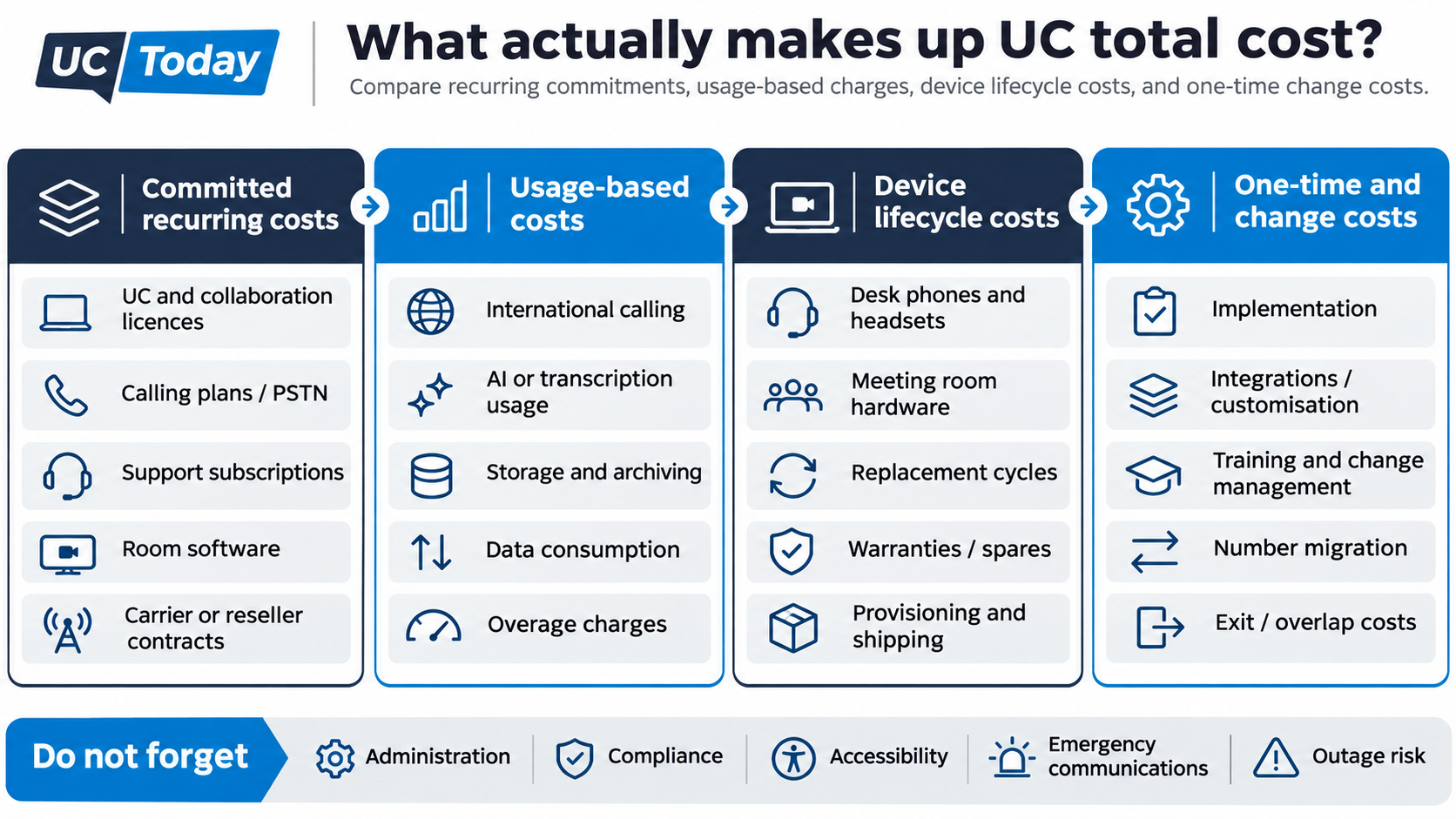
UC Total Cost of Ownership needs to account for subscription prices, telephony, support bills, meeting rooms and hardware, administration, governance, overlapping contracts, and even AI expenses.
-
Getting the most bang for your buck starts with an audit: find out what you really need by comparing purchased licenses, assigned users, usage, and anything else you know about your ecosystem before buying or consolidating anything.
-
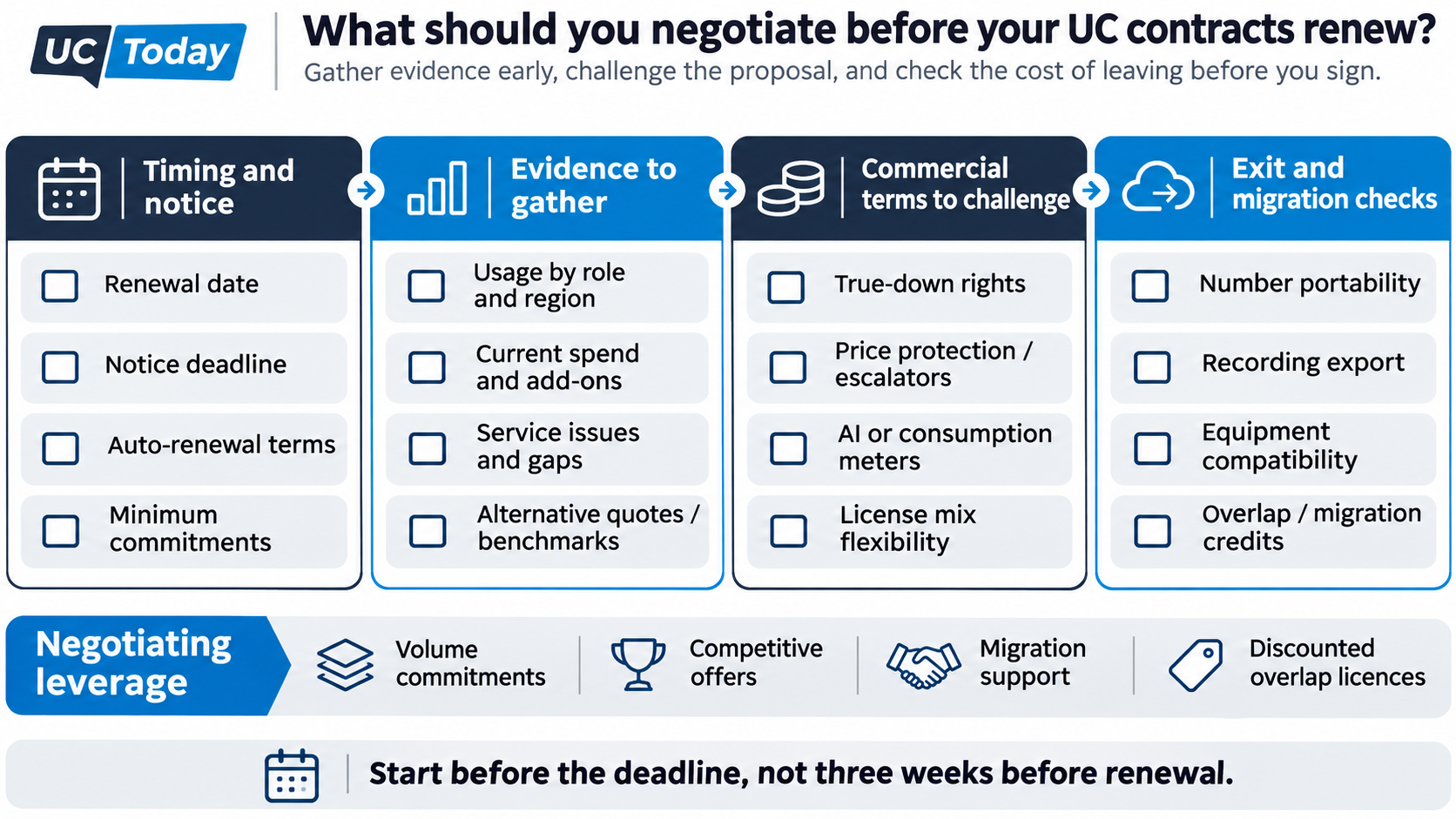
Negotiations should start with vendors long before you desperately need to renew a contract. Know your notice dates, ask plenty of questions, demand clear terms, and always challenge minimum commitments when you can.
-
Keep an eye on your spending over time with monitoring tools, and ensure you have a plan for balancing spend, performance, and control.
UC TCO: How Do You Find Out What You’re Paying For?
If only getting your baseline ready was as easy as looking at the last couple of months of bills. It seems like nothing’s quite that simple anymore; though arguably, your invoices are still the right place to start, you just need to make sure you’re checking all of them.
Fragmented UC stacks, which often develop over years of different teams “adding stuff on” to the current ecosystem, can hide a lot of extra costs. As Mark Sher, SVP of Product Marketing at Intermedia, told us:
“The cost is lost revenue, inefficiency, lost time, duplicating time. All of those costs can definitely add up, and they can also be removed.”
Start With Your Invoices
This means every single invoice connected to something that’s powering or supporting your unified communication strategy. You might need to include your UCaaS contract, purchase orders, administrative reports, supplier invoices, and costs for telephony and AI access. Compare your contracted commitments, purchased licenses, assigned licenses, actual usage, and your billed charges (including any you hadn’t expected to see).
If you’re purchasing services and separate regional agreements through resellers, keep those in mind too; they can be easy to overlook when you’ve got IT managing platforms, and procurement handling all the paperwork.
|
What to check |
What to record |
|---|---|
|
Product and owner |
Platform, supplier, responsible team |
|
Entitlements |
Users, rooms, phone numbers, license tiers |
|
Usage evidence |
Active features, dates, exceptions |
|
Actual spending |
Annual charges, currency, billing unit |
|
Contract terms |
Renewal date, notice period, minimum commitment |
How Do You Identify Unused and Underused UC Licenses?
Probably don’t go around surveying your employees; however comfortable they feel with leadership, they’re still probably going to tell you what they think you want to hear.
As an example, back in October 2025, VOSS went through around 15 million call records for a multinational business with over 100,000 employees, and found 17,000 inactive licenses, plus thousands of unused devices.
There are plenty of tools from UC service management vendors, and even features built into existing systems, like Microsoft Teams, that can help you get an idea of real usage; just make sure you don’t rush into the assumption that every dormant license needs to be removed.
Even if an employee only uses a particular tool once every couple of months, what they use it for could be well worth the continued spend.
Before getting rid of anything, try talking to your people, checking role-specific requirements, and asking yourself whether each employee can still achieve the same results without specific features.
Remember The Add-Ons
The hidden costs catch people out the most, and really, they’re not even hidden; they’re just surprisingly easy to forget about when you’re crunching the numbers. Hidden costs can add up in everything from what you pay for specialist integrations to extra fees for international calling minutes or emergency on-site support. Check:
-
Bandwidth and quality of service costs
-
Integration and customization costs
-
Operational and administrative overhead
-
Training and change management (especially for new tools)
-
Compliance and security costs
-
AI add-on fees
Also think about how much you pay experts to fix things when collaboration friction or problems occur, and how much disruptions actually cost you in terms of productivity and performance.
How Do You Calculate the True Total Cost of UC?
You’ve hopefully done all the work of gathering the figures, so don’t make the classic mistake of multiplying the advertised seat price for your platform by your total number of employees and assuming you have everything you need.
Go through everything you’ve collected, and make sure you’ve added up everything for software, hardware, and keeping the whole communication system running, whether you’re being billed by a UC provider, carrier, reseller, or even your own IT team. Then compare the functionality you can get from each new solution.
Usually, it also helps to split the fixed expenses from the variable charges and one-time costs:
|
Type of cost |
What might be included |
|---|---|
|
Fixed costs |
UC software licenses and premium add-ons, room software, shared devices, calling plans, support plans, SIP trunks or SBCs, connectivity solutions, maintenance, security subscriptions, leases and warranties |
|
Variable |
International/domestic or toll-free calls, conferencing, carrier surcharges, AI tokens or credits, transcription, recording and storage, data ingestion, API use and overages |
|
One-time and change |
Design and implementation costs, consultation fees, integrations, cabling, endpoint purchases and refresh, training, testing, number porting, migration, dual running charges, exit fees |
Be particularly cautious with administration fees; they might not seem like a big deal, but someone has to provision your users, manage phone numbers, and keep those suppliers coordinated.
In fact, Pascal Moindrot, the COO of Kurmi Software, once told us:
“Provisioning users across multiple apps and communications platforms is both costly and labor-intensive.”
To the best of our knowledge‚ this is still true today‚ years later․
It's important to control compliance costs‚ particularly, which can grow quickly for reasons including data collection costs and data storage and search costs․
Other factors to consider might include hardware guarantees and replacement cycles‚ network outage issues‚ and other special needs‚ including accessibility and emergency communication needs․ Try to add and estimate other known costs․
How Do Bundles, Calling Plans, and Consumption Pricing Change the Cost?
No major surprise‚ but it depends on your chosen vendor. You can have a “bundle” that doesn’t necessarily include everything; Microsoft Teams Phone licenses, for instance, don’t automatically include telephone numbers and PSTN connectivity. You also might need to think about calling plans and how they compare to operator connect or direct routing:
When we were interviewing Lane Shelton‚ a licensing consultant at Directions on Microsoft‚ he shared the following information about the Microsoft $99 E7 offer:
“the $99 number‚ on its own‚ is only the down payment on the total investment required to operate E7 at scale․”
I suggest checking prices and other deals for bundled products and phone services with all companies․
Consumption-based pricing plans can be complicated, too, by different provider options and methods for calculating and billing consumption‚ such as transcribed minutes and usage-based data and storage services․ Consider talking with your provider about how everything will be metered and whether allowances expire before using consumption-based services․
Build Your Own UC TCO Worksheet
There’s a basic model for UC TCO that you can use to establish a baseline․
Total TCO for Unified Communications over a period = Recurring costs for a period + one-time costs + costs of transitioning in and out of a solution․
Use that when you’re comparing UC vendors, and use the same period for all of your calculations; record quantities, billing units, currencies, tax assumptions, and even the price changes you might expect every year. Also keep a year-by-year view of when contracts and starting prices expire, replacement charges begin, and older services can be switched off.
Then look at all of your options evenly. What’s the difference between keeping and upgrading your current estate, consolidating some of your existing suppliers, or migrating to an entirely new system? Try to use identical room and role counts, and keep regional calling needs, accessibility, and service standards in mind too, alongside third-party supplier charges, contractual minimums, and realistic consumption scenarios.
Which UC Licenses and Platforms Should You Keep, Right-Size, or Retire?
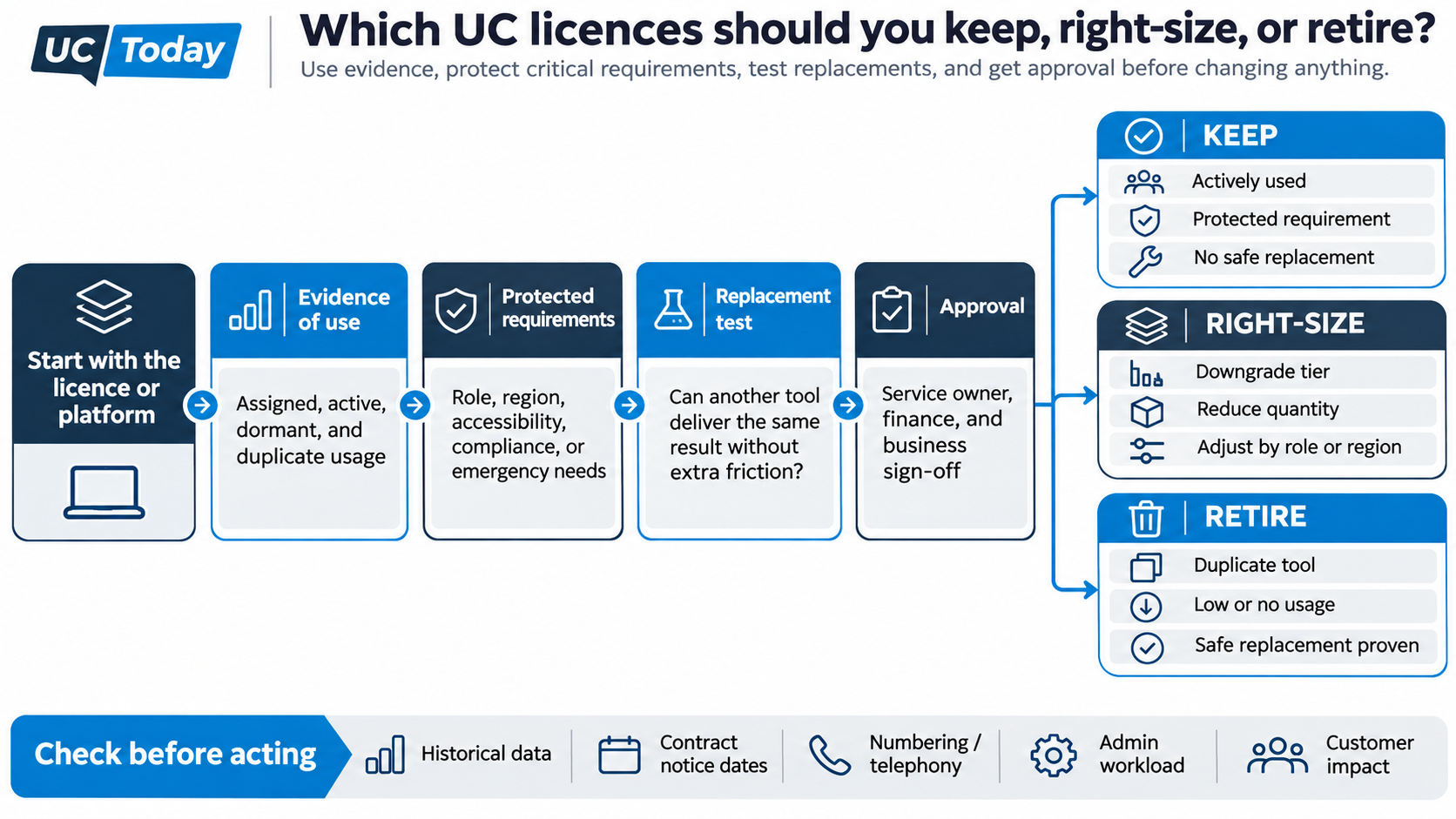
As we said, it’s best not to get scissor-happy with your bill too fast. As tempting as it is to try and cut every single overlapping subscription, that’s not always the right way forward. Sometimes you get rid of an apparently “redundant” platform that was actually doing something essential.
Aim to get evidence that a replacement actually works, or that your team can get by without a feature before you start writing a retirement plan.
When Is UC Platform Consolidation Worthwhile?
Usually, when you’re genuinely paying for features twice, or spending on licenses you don’t need just to give team members more options. As nice as flexibility and freedom of choice are, they can easily lead to a fragmented tool stack that makes costs higher and upgrades more complicated.
Brandeis University is a good example of a group that used consolidation the right way, and it didn’t just do it for the cost benefits. As Senior Associate Director of Network Communications and Digital Media, Eli Jacobson said to us:
“There’s always an element of it that’s cost, but that’s not all of it.”
The university reduced its number of available video platforms from three to two, initially, and even turned Zoom into its central space for internal communications, contact center support, and AI virtual assistance. The important thing is that it didn’t try to consolidate everything at once, which makes sense, since replacing a specialist tool could mean buying additional features, rebuilding integrations, or keeping the old system running anyway.
When Should You Keep Things As They Are?
The answer to whether you should standardize or diversify your collaboration platforms isn’t always automatically “standardize”, even if that seems cheaper.
We’ve covered this before, but sometimes multi-platform strategies do make sense, particularly if you’re working with providers, agencies, customers, or contractors who prefer to use other tools, or if different business units have very specific workflow needs.
Sometimes you even need to maintain multiple licenses because the regional and regulatory requirements diverge in a global setup, or because even though one platform has a similar feature to another, they both give you different benefits.
We’ve seen this with companies comparing Microsoft Teams Rooms and Cisco Rooms for workplace management. Cisco is great if you already have a lot of Cisco tech; Microsoft gives you more freedom to manage external devices.
If you decide to keep something “for now”, then set up a specific timeline for when you’re going to review again; otherwise, you could end up paying extra just because you don’t want to handle the headaches involved with change.
Which Licenses Can You Safely Right-Size?
If the answer isn’t to “get rid of a license completely” but just tighten things up a little, start with employee requirements before you start making assumptions based on job titles. No matter what their role says, someone who attends meetings all day might need a very different subscription from someone handling international calls.
One pretty good option is Microsoft Teams Shared Calling, which lets users share a phone number instead of working through individual numbers and calling plans, although everyone still needs a Teams Phone license.
A good approach to rightsizing should also account for possible exceptions, caused by regional regulations, accessibility needs, recording requirements, and even business continuity plans.
Use a Keep, Right-Size, or Retire Decision Matrix
Before you do anything, here’s what to check and what you might consider: