
It’s funny how life works; a couple of years ago I barely knew anything about AI beyond novels and movies, and now I work with a whole selection of AI tools and colleagues just about every day. No wonder so many companies get confused about what flavor of intelligence they need, and what they’re going to use it for.
The trouble with that, though, is the confusion isn’t slowing anyone down as much as it probably should. As McKinsey found in August 2026, 40% of respondents to a survey at organizations earning more than $1 billion were scaling things like AI agents. Not long before that, KPMG shared that a slightly higher percentage (42%) couldn’t actually see where their AI money was going.
Before any company rushes into buying a new AI solution for the workplace, it’s worth getting a better idea of how the options differ, what they can actually do, where you’d be best off using them, and how you’re going to track if they’re actually paying off.
Key Takeaways:
-
Start with the problem: Instead of choosing an AI agent over an assistant for no particular reason, think about the task you need to do and the decision-making power the tool needs.
-
Check what you already have: Chances are your existing UC platform or other tools for project management already include various types of AI, so make sure you’re not paying for the same thing twice.
-
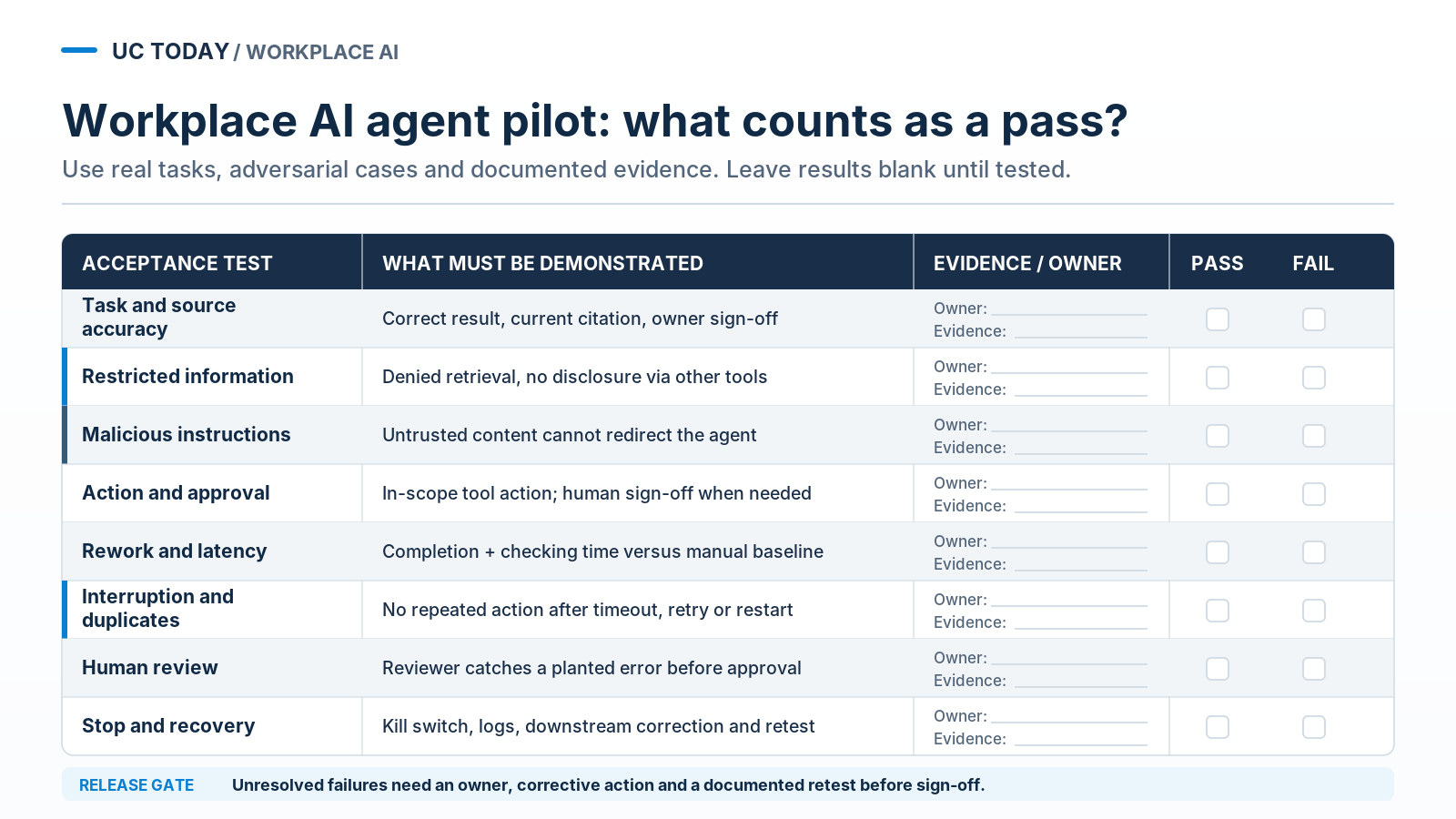
Make vendors prove everything: Test your permission options, human approval workflows, recovery options, and fixes for common mistakes, especially with AI agents.
-
Know what to look for: Decide exactly what kind of AI metrics you’re going to be tracking, from employee productivity results to the cost of human rework.
What’s the Difference Between a Workplace AI Assistant and an AI Agent?
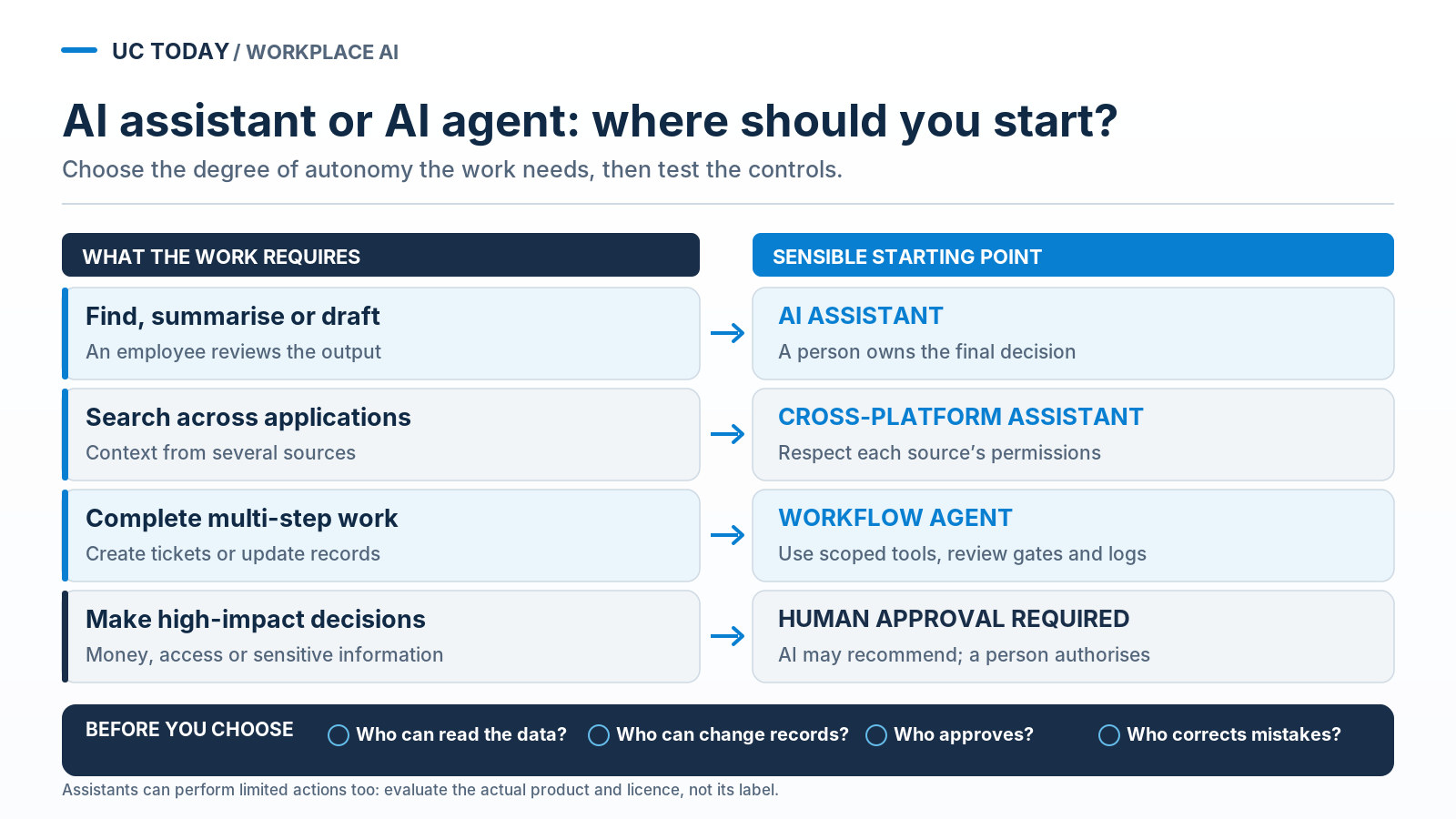
AI assistants and agents will both help increase productivity in the workplace, but what differs is the level of autonomy (and initiative) they actually have.
AI assistants usually help support humans by searching for certain information, drafting, or answering questions. Most generally need some level of human support to complete multi-stage tasks, though some assistants definitely can do things like uploading files to a folder or updating a CRM.
AI agents, on the other hand, function more as proactive colleagues within your organization. They can analyze a task, create a plan to complete it, and then utilize other tools via their APIs to get the work done (hopefully following the rules you’ve set).
Basically, it’s like choosing between a supportive intern and a full digital employee.
Which Workplace Workflows Are Actually Worth Automating?
You should probably know this by now, but striving for limitless automation isn’t really a good idea, no matter how great you think your AI tools are. That’s especially true if you’re using human staff and AI side-by-side; adding AI to the mix on some tasks just adds extra work to your team’s plate, because they have to double-check and correct everything.
The best option (based on what we have seen leading organizations do) is to identify tasks that your manual workforce would perform that are labor-intensive, rules-based, and high-volume. Also make sure the risks aren’t too high if something does go wrong.
With workplace workflows, you might consider:
-
Background meeting work: Suggesting agendas, transcribing, summarizing, and assigning tasks.
-
Knowledge management: Finding information, updating policies, and answering questions.
-
HR and administration: Pre-hiring documentation and support, basic onboarding, leave policies, and training.
-
IT and security provisioning: Automated assignment of devices/licenses, employee offboarding, patching and timely alerts for security breaches.
|
Task |
Owner |
Information required |
Possible action |
Approval |
|---|---|---|---|---|
|
Meeting follow-up |
Meeting lead |
Transcript/Agenda |
Create tasks and assign owners |
Confirm commitments |
|
Enterprise knowledge |
Content owner |
Current policies |
Answer from sources |
Check restricted content |
|
Internal approvals |
Process owner |
Policy and Request |
Create recommendation |
Authorize decision |
|
IT service request |
IT service lead |
Knowledge base and Ticket |
Create or assign ticket |
Approve privileged changes |
Remember, sometimes the task shouldn’t be automated at all, particularly if you’re dealing with things like sensitive information or compliance risks. Other times, you might need to consider autonomy with limits, like Rakuten France did when it embedded Notion Custom Agents into its review project backlogs. The company didn’t let the agents automatically try to fix everything, just send problem insights to team members in Slack.
Should You Choose AI Built Into Your UC Platform or a Separate Agent Layer?
Once you’ve figured out where you’re probably going to be using AI to ramp up productivity, the next step is deciding how you’ll access it.
You’ll struggle to find a UC or collaboration platform these days that doesn’t have its own assistants, agents, and customizable tools, so start with what you’re already paying for. If you already have a platform that can bring agents into shared team workflows, or offer assistance with some basic tasks, there’s probably no need to pay for something new.
Comparing Your Three Main Options
|
Model |
Context and access |
Action and review |
Buying risk |
|---|---|---|---|
|
Embedded assistant |
Native UC content and tenant permissions |
Summaries; supported actions vary by plan |
Feature restrictions or extra licenses |
|
Cross-platform assistant |
Connectors must respect each source’s rights |
Search and drafts; tool actions vary |
Stale indexes, connector gaps, per-user cost |
|
Workflow agent layer |
Delegated or separate agent identity across apps |
Approved tools, action logs and human gates |
Usage, outside-app charges and support owner |
All three options have their own appeal, but it’s worth taking some time when you’re comparing your choices to find out exactly what information the tool can use, what kinds of changes it can make (and if they need to be approved first), and who’s going to be in charge of fixing any mistakes.
Run your prospective workflow task through each type of tool if you’re not sure, and find out for yourself which applications get triggered, which permissions get taken advantage of, how many approval steps there are, and if the work ends up coming back to a human for corrections.
Also, keep track of the costs; those are tricky at the best of times.
Some companies will stick with the assistants and agents they already have, especially if access is already bundled into licenses. Other times, you’ll need something more flexible, especially when the information your agents probably need gets scattered across platforms.
Kevin Kieller, the co-founder and Lead UC&C Strategist at enableUC, drew attention to how problematic that can be in an interview with us recently:
“All of us have meetings on every different platform every week, and we have business data and knowledge in a whole host of platforms.”
Check Who Owns the Context When AI Works Across Platforms
Whether you end up using an AI copilot, cross-platform assistants, or agents that can work across a bunch of different platforms at once, the most important thing to be wary of is who ends up owning the context your tools rely on.
Most agents end up needing to pull information from several applications; even if you’re only using one core UC platform, they might need to extract data from workforce engagement tools, task management apps, or calendars to fill out their context graphs.
What you need to know is whether you can take that context and the custom workflows the agent builds with you somewhere else when your contract ends.
Our very own publisher Rob Scott recently noted:
“Switching costs are about to move from your phone system to your data.”
How Do You Prepare Enterprise Data and Permissions for Workplace AI?
Unfortunately, plenty of business execs forget to ask this question before it’s too late. Just because you have a UC system that can support AI doesn’t mean you’re ready to implement AI, regardless of whether it’s a simple assistant or a team of agents.
The prep work obviously differs a bit depending on how much you’re expecting an AI tool to do, but there’s no skipping the basics. Preparation steps include collecting relevant data from various sources‚ such as documents stored in SharePoint‚ CRM data‚ and audio recordings of meetings․ You’ll also need to invest some time into flagging high-priority documents‚ redacting or otherwise restricting access to confidential documents‚ and removing irrelevant data․
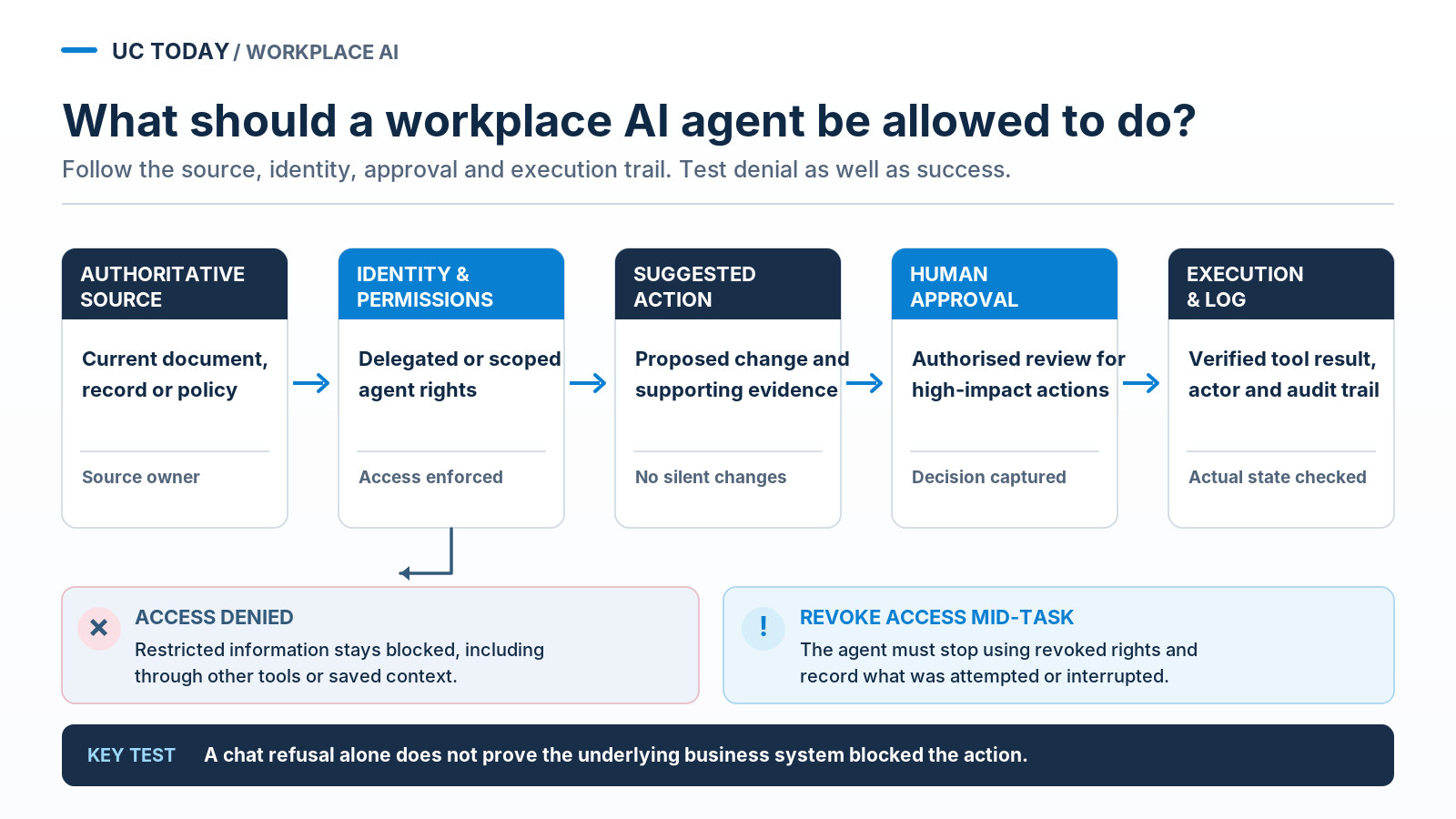
Then, make sure your AI tools respect the permissions attached to different kinds of information. An assistant probably shouldn’t be able to retrieve a document that your human employees can’t access, and agents shouldn’t suddenly get more permissions because they happen to be connected to multiple applications.
Giving every tool access to as much data as possible might seem helpful, but it tends to expose you to risk you’d rather not tackle. As Nishanth Sirikonda, Cloud Solutions Architect at FirstDay Foundation, told us:
“Direct access does not automatically mean the AI should have access.”
Readiness Questions I’d Put to IT and the Data Owner
At an absolute minimum, I’d ask about these things first:
-
Source quality: Which policies are authoritative, current, and properly labeled?
-
Permissions: Are permissions applied consistently across systems, AI context, and search results?
-
Identity: Does the agent use delegated permissions or its own identity? Can permissions be revoked?
-
Disclosure: Is information visible that employees may see?
-
Data terms: Where is the content and output processed? Are there residency, retention, and model training agreements?
-
Meeting records: Who’s responsible for managing consents, output summaries, and retention?
It’s also a pretty good idea to examine what might happen if you decide to suddenly change a tool’s permissions when they’re midway through a task. You never know when you might need to make a quick update. Set up separate employee accounts, and revoke project access mid-task to see whether the agent can still do anything with its saved context. If it can, you might have a compliance issue.