We’ve been pretty interested in the potential of immersive work for a while now, especially when it supports better collaboration and communication, stronger training opportunities, and more effective frontline support. Businesses are clearly paying attention if you look at the market, where analysts estimate XR will be worth more than $81 billion by 2032.
Still, as we’ve said quite a few times over the last couple of years, an enterprise XR program really does need more than a couple of pairs of smart glasses and a handful of VR headsets to pay off. You need to redesign work around the benefits immersive tech has to offer.
That’s what we hope this guide will help you do: understand the value VR, AR, MR, and spatial solutions have to offer, figure out which workflows you should upgrade, prepare the workplace before you buy anything, and make sure you’re equipped to run a strategy that truly pays off.
Key Takeaways:
-
Before you buy anything, make sure you have a clear idea of which work really benefits from an immersive experience, from collaboration to training.
-
Know your format options, from VR, to AR, to MR, and think about how each choice affects the kind of work you’ll need to do to support your team.
-
Run a pilot that tests for everything, from overall comfort and accessibility to performance improvements and governance.
-
Estimate the full cost for your enterprise XR strategy, including hardware, content creation, maintenance, and support costs.
When Is Immersive Work Worth Investing In?
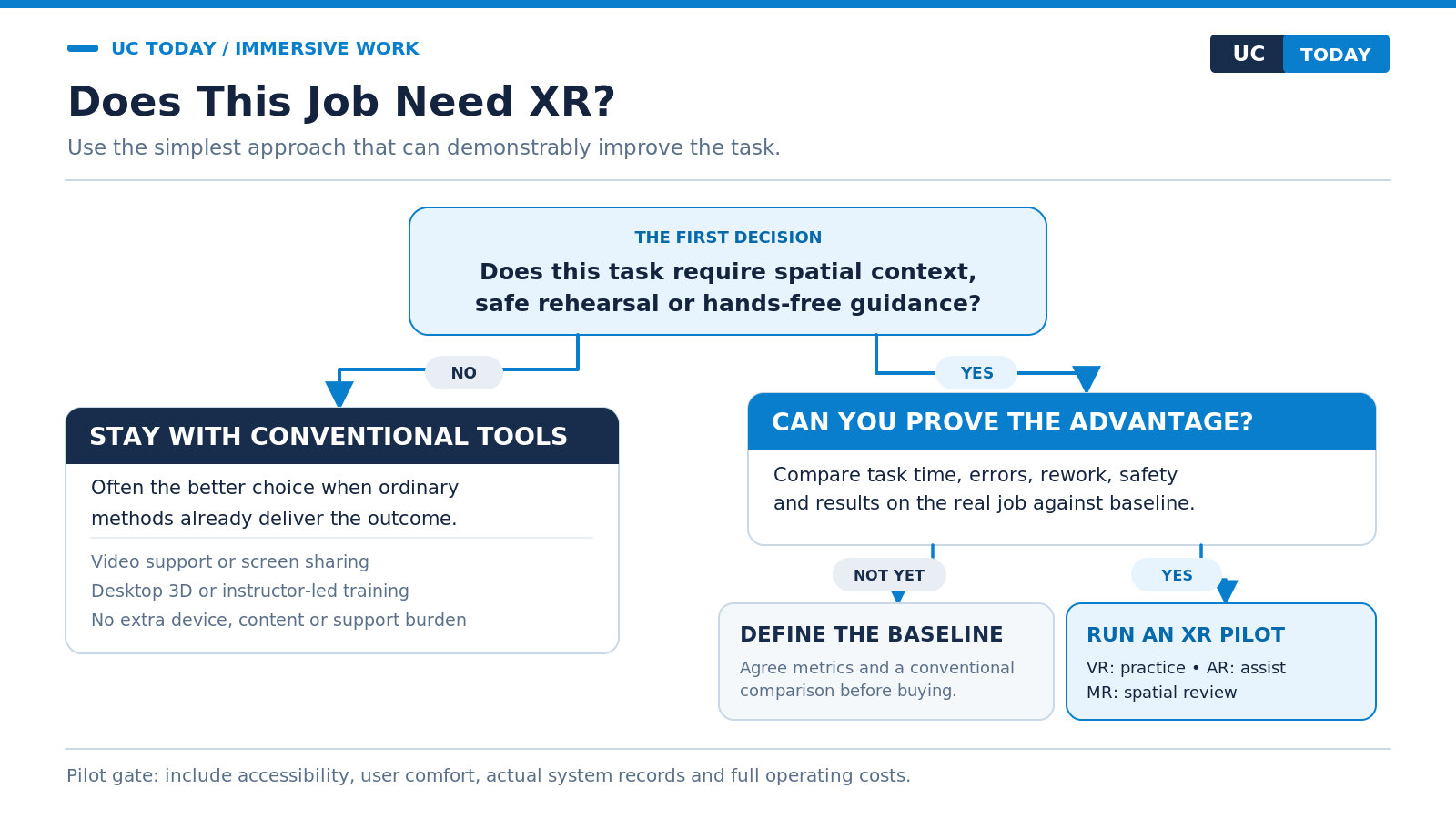
XR can be exciting; we’ve already talked at length about the various ways immersive technology can deliver real business value. But XR is a lot like other disruptive technologies (such as AI); just because you can potentially use it in a certain workflow doesn’t mean you should.
Every work stream or process you upgrade with XR needs redesigning; otherwise, you’ll just end up with a more complicated office. So you need to be specific about what you actually need to change. Look for work where mistakes cost a lot of money, or safe practice might be hard to arrange. Don’t just assume everything your team does can be done better in VR.
|
Use case
|
Where XR could help
|
Evidence to request
|
Conventional comparison
|
|
Training and simulation
|
Safe training for low-frequency, high-risk, or expensive processes.
|
Qualification time and performance on the real task
|
Instructor-led or desktop simulation
|
|
Frontline assistance
|
Guided, annotated, remote expert.
|
First time to fix and re-visits.
|
Phone or video support
|
|
Design and digital twins
|
Review full-scale complex equipment or designs.
|
Reduction in rework time and time taken to review.
|
CAD or desktop 3D review
|
|
Spatial collaboration
|
Remote individuals can review models.
|
Decision-making and correction.
|
Video meeting and screen share
|
A great example of a solid workflow for XR comes from AstraZeneca. Danny Allen presented a project using AR for wayfinding at the 2026 Augmented Enterprise Summit in a session called “Finding 7,000 Needles,” showing how AR can be used to help technicians and quality control staff find assets.
Elsewhere, Howden invested in XR for the workplace with a similar specific focus, ensuring the team could provide equipment expertise. The company managed to expand from seven to 144 users within weeks, with plenty of help from PTC:
“We didn’t want to have to do any software development or worry about hardware requirements.”
When Is a Simpler Tool the Better Choice?
This can be easily worked out by asking a member of your team to walk through how the task would be completed currently. Are there any issues with the current process? If not, you’re probably getting ahead of yourself by thinking about XR.
Someone who regularly diagnoses repairs over a Teams call probably won’t need a pair of smart glasses to do their job better; adding them might even increase your privacy concerns.
Any changes made should be able to prove that using spatial awareness, hands-free operation, and better rehearsal will improve the outcome of the task to exceed the cost of the device, support, and maintenance of content.
VR vs AR vs Mixed Reality: Which Approach Is Right for Your Business?
Virtual reality, augmented reality, and mixed reality all work best for different kinds of tasks. If you’re looking for a safe method of allowing employees to practice a task, then VR may be the perfect solution. If you’re looking to build muscle memory, then AR or Mixed Reality may be ideal.
There’s no need to commit to smart glasses and nothing else just because you think they look good.
|
Technology
|
Where it earns consideration
|
Features and limitations to test
|
|
VR
|
Safe training for high-risk or difficult-to-replicate scenarios.
|
Realistic scenarios, branched scenarios, assessment and movement.
|
|
AR / assisted reality
|
Guided or expert support.
|
Clear display, hands-free controls, annotation, tracking, and PPE.
|
|
MR
|
Anchoring and manipulating digital objects.
|
Accurate spatial awareness, importing models, interaction and mapping.
|
|
Browser / desktop 3D
|
Reviewing or training on assets without a headset.
|
Good rendering, easy controls, compatibility with browsers and devices.
|
The method of delivery is worth a think about, too. If you have a digital twin linked to a physical asset/process, you can view this via Mixed Reality or traditional methods; it’s up to you to figure out what gives you the most value.
Should Businesses Choose Headsets, Smart Glasses or Browser-Based Experiences?
Smart glasses are definitely starting to get a lot more attention lately, even in spite of some of the privacy concerns that seem to be orbiting around them. IDC found that XR glasses shipments increased by 79.8% year over year in the second quarter of 2026, while mixed reality headset shipments fell by 22.3%.
Still, that just tells you about the current market trends; it doesn’t necessarily answer the question of what kind of immersive technology your team actually needs.
Smart glasses could be ideal for frontline workers or everyday team members who need a little bit of extra support without having to carry around clunky headsets. Mixed reality or VR could still be the better options for deep training simulations.
Just don’t assume that smart glasses are automatically the most comfortable and practical option. Hololight’s Co-Founder and Managing Director Florian Hapsinger said this when we asked him if Snap’s smart specs could probably be worn all day:
“Is it good enough for eight hours every day? Maybe not.”
What Should You Look for in an Enterprise XR Platform?
One thing worth keeping in mind is that an enterprise XR program depends on more than just the right choice of hardware. You need a platform for managing and distributing content and applications too. If you’re not sure where to start there, find out what the vendor’s really offering first.
Some companies give you access to a single, specialized application; others give you a full content-and-device platform, or a system that includes tools for XR device management.
Look at the software behind the platform too. OpenXR is great if you want your developers to target different XR runtimes. However, it doesn’t guarantee that your bespoke code, 3D models, or training data will easily transfer between suppliers.
If you’re testing a platform before a pilot, ask the vendor to show you what happens when you apply an update, take access away from a specific user, and recover a device when you don’t have access to the app developer. Also make sure you understand what content you will be able to take with you.
What Must Be in Place Before an Enterprise XR Rollout?
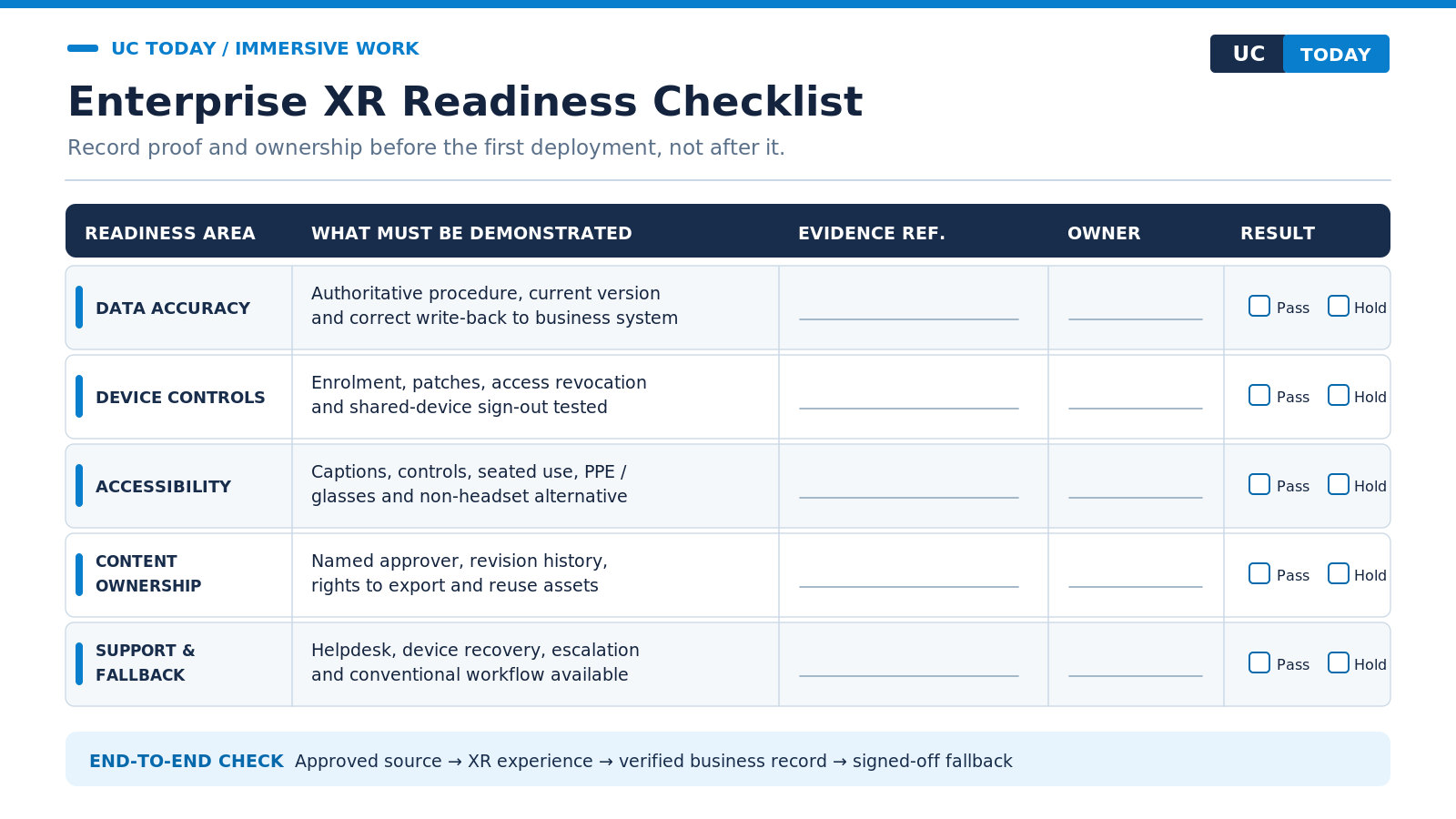
Usually, a lot more than business leaders tend to expect, which is why even though your team might be excited about the concept of immersive work, XR adoption can suddenly flatline after the first month.
The first things to consider will be your data, integrations, and content. Consider one of the workflows you want to make more immersive. Walk through the workflow from source to screen and back. If one of your technicians opens an instruction in an XR device, where is the procedure coming from? Can they see what version is approved? What happens once the task is completed? Do you have an integration that updates a system, or do you need to complete that manually?
For content, you’ve got options. An off-the-shelf module will probably work fine for generic training, while a configurable template might be a better choice if you’ve got common procedures with a few local variations. If you have a unique machine, decision pathway, or process, then bespoke content may be a better option (even if it’s a bit more expensive).
You might be able to reuse CAD files, facility maps, and approved learning materials, too, but don’t assume everything you already have is correct and up to date just because it exists; you’ll need to double-check. The same warning applies to AI-generated scenarios: assign a subject-matter approver, keep a version history, and test the revised content before release.
How Do You Address Security, Accessibility, and User Comfort?
A solid enterprise XR strategy should consider more than just headsets and installing applications. Your IT team needs clear policies for enrollment, updates, tracking device inventory, signing out shared users, and dealing with lost equipment.
Your security team also needs to think carefully about the kind of data those immersive devices might collect. Headsets with cameras and microphones can collect all kinds of sensitive information about employees and customers, so you’ll need to decide where recording should be prohibited, and who can access the material you capture. You’ll also need to be clear with team members about how much you’re actually tracking, as Dr. Jordan Tsigarides told us:
“You have to be making your employees aware of what you’re using the technology for.”
Then there’s the accessibility question; we’ve said before that XR could actually help to improve inclusivity in the workplace, if you know how to use it properly.
Test the solution with relevant staff. Can they adjust the size of captions, change controls, complete the task whilst sitting down, avoid any motion-based effects, or complete it via a non-headset method? It’s also worth checking that the devices you’re looking at will work with prescription glasses or PPE.
Who Owns the Program After Deployment?
Just like any other device or software solution in your workspace, an enterprise XR program needs ownership. You’ll need to figure out exactly who’s responsible for what. Maybe IT will be looking after the provision and issues, security and privacy teams will be involved with data, and content owners will be approving content and updates.
Companies should also have one “sponsor” for the whole program who’s keeping track of the required outcomes, managing the budget, and deciding if the initiative should continue, be scaled, or removed altogether.
How Do You Test Whether Immersive Work Actually Delivers Value?
We’ve spoken to enough companies experimenting with immersive work to know that proving ROI isn’t always as straightforward as you’d think. There are plenty of great studies and reports showing what XR can provide your organization for training or collaboration, but none of them guarantee every company will get the same results.
To see whether your stack’s delivering real value, set a baseline. Pick one of those repeatable tasks you think might be ideal for XR enhancement. Record how long the task takes, how many errors usually occur, and if there’s a lot of rework.
If you’re looking into XR for training purposes, get feedback from your team members too, record what they experienced, and whether their competence and confidence actually increased on the job. Don’t expect average adoption rates or engagement metrics to tell you everything.
What Should an Enterprise XR Pilot Actually Test?
XR Pilots tend to go wrong for a very simple reason: companies jump straight into experimenting with the experience, without actually figuring out what they want in the first place. Florian Haspinger from Hololight even gave his opinion on why initial tests cause problems:
“The pilot was never designed to answer the right questions.”
If you’re running a pilot, make sure you have a pass/fail test ready:
|
Acceptance test
|
Evidence to collect
|
Pass/fail threshold
|
|
Task performance
|
Comparable completion times, error counts and rework
|
|
|
Skill transfer
|
Independent assessment on the physical task
|
|
|
User access and comfort
|
PPE fit, accessibility trials, dropout reasons
|
|
|
Reliability
|
Concurrent users, latency, tracking errors, recovery
|
|
|
System records
|
Correct updates to the approved business system
|
|
|
Continued use
|
Repeat use when the task recurs
|
|
|
Business result
|
Verified benefits less support and operating cost
|
|
Always include at least one failure test (even if it’s not much fun). You need to find out what happens when the connection drops, or the tracking functionality breaks before you start equipping everyone with fancy new tech.
Does Better Simulation Performance Translate Into Real Work?
Sometimes, XR can seriously improve training outcomes and make employees a lot more capable in their roles, but you won’t always see the impact instantly.
A review published in BMC Medical Education in November, 2026 looked at 23 randomized trials with 1,202 participants and found VR provided higher average-scored outcomes in health professions education, particularly procedural skills.
Still, the study results varied considerably, which tells you a lot about why running your own tests is so important. If you want a good example of what those tests might look like, KBI Biopharma, Jubilant HollisterStier, and Kindeva are taking part in BARDA-backed XR training pilots with independent comparison against conventional instruction. Measures include time to proficiency and qualification, which are very useful metrics to track in this particular case.
When Should an XR Pilot Be Stopped or Redesigned?
Usually, it’s best to stop a pilot right away if an accessibility or crucial safety feature stops working. If the problem is fixable, like a content or connection issue, you can probably go back to the drawing board for a bit of redesign work.
One important thing to keep in mind is that the initial pilot should have an obvious stop date; you can’t carry on experimenting forever in the hope that you’ll be able to prevent every possible future problem. Decide on a point where the experiment turns into a new workflow, then keep track of how employees handle the experience over time.
What Does an Immersive Work Program Really Cost?
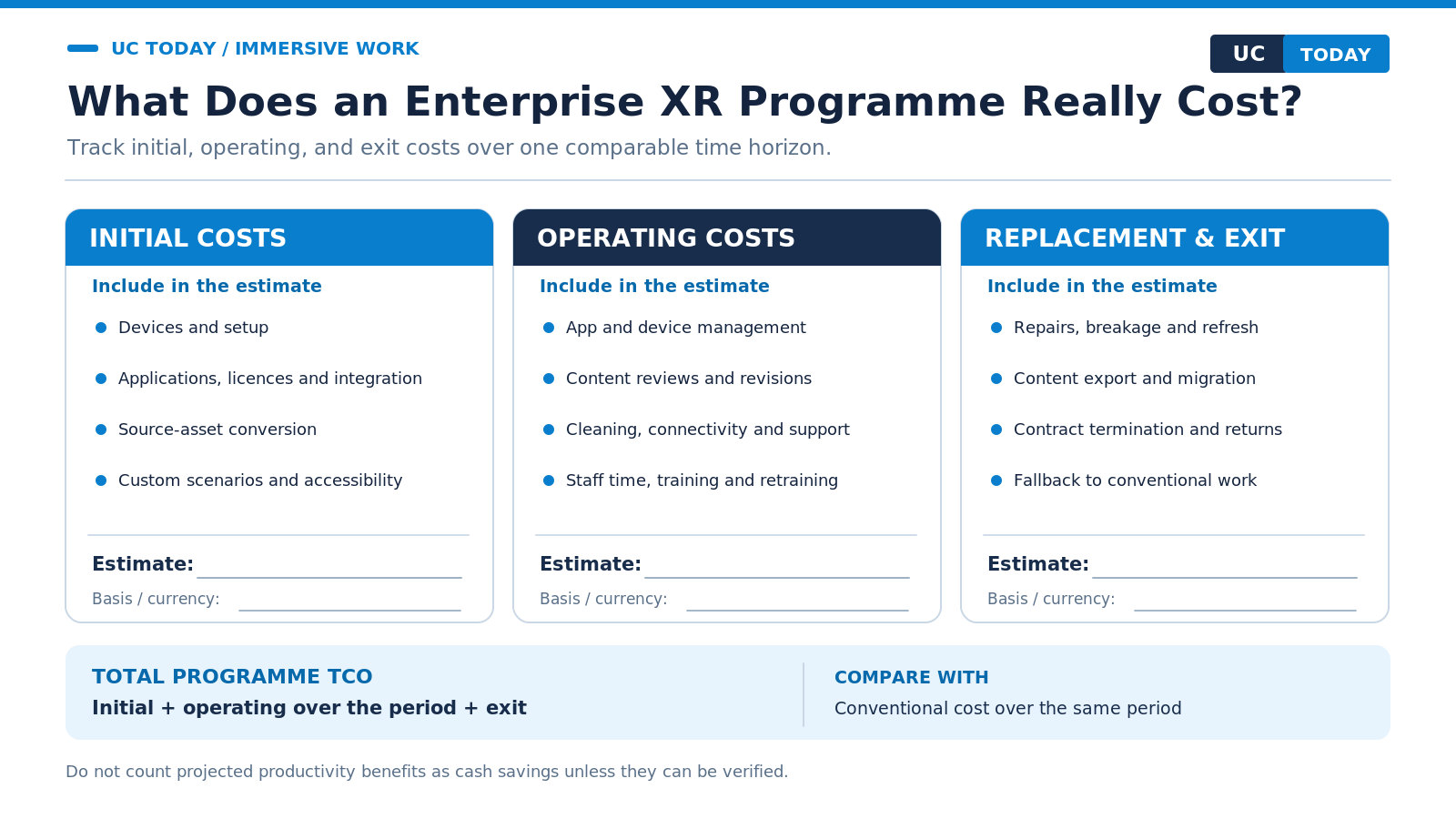
We cover this in a lot more detail in our XR TCO guide, but the first thing to recognize is that a headset or pair of smart glasses is the easiest line item in your budget. You also need to think about content production and management, maintenance, and everything else that keeps your enterprise XR program running smoothly:
|
Cost category
|
Include in the business case
|
|
Initial
|
Devices, setup, licenses, source-asset conversion, custom scenarios, integration, accessibility adjustments
|
|
Operating
|
App and device management, staff time, content reviews, cleaning, support, connectivity, retraining
|
|
Replacement and exit
|
Breakage, refresh cycles, migration, content export, contract termination and fallback process
|
When you’re talking to vendors, ask how licenses are counted, too. Sometimes it’s per named employee, device, site, application, or concurrent session; certain vendors also have specific rules for minimum commitments, unused seats, and renewal increases.
How Should You Calculate XR ROI and Break-Even?
Calculate ROI more or less the same way you’d measure it for any new technology investment. Choose a specific time horizon, measure things like overall time taken to complete a task, rework, and productivity when employees use the old method, then compare that to what happens when XR’s involved.
Think carefully about what you’re actually using XR for, too. An XR training module might take a bit longer to complete than an online workshop, but it pays off if that means that your employees are more efficient, safer, or more productive in their day-to-day work.
It’s also worth keeping an eye on how far the content you’re using can actually go. How often do you reuse modules, and how much are you going to spend on regular updates?
What Happens If Your XR Supplier Changes Direction?
That can happen; in fact, ENGAGE announced that it was shutting down its immersive platform on October 31st, 2026, saying:
“Current market conditions have made it increasingly difficult to continue operating a platform of this size.”
Microsoft also shared that its Dynamics 365 Guides and Remote Assist tools would stop working at the end of December 2026, although the Dataverse data should be retained.
You probably can’t stop a vendor from switching directions, but you can prepare. Ask exactly which experiences, records, and files can be exported, what permissions survive a move, and how long a replacement would take if your current devices or software stop working.
How Do You Scale Immersive Work Beyond a Successful Pilot?
The second site is a better test than the launch party. If different employees can obtain similar results without the original developers standing nearby, the program has a chance of translating into normal, everyday work.
What Makes an XR Program Ready to Scale?
We’ve given plenty of advice on this, but often the best thing to do is plan for the future. Create a playbook for the local manager to follow. Approved devices, accounts, training, escalation to the help desk, updates, and a return to traditional tasks. Ensure results are returned to the correct systems. Have a business sponsor who will decide when content needs updating or removal.
Keep watching what’s going on, too, even after the first few weeks. For a frequently repeated job, checkpoints around weeks four, eight, and twelve can show whether employees continue choosing XR over traditional options, how many sessions are abandoned, and whether support tickets are falling. For rare tasks, measure each available occurrence rather than inventing a monthly adoption target.
Use the information you gather to decide what the next stage of your program should be:
|
Decision
|
Evidence that would justify it
|
|
Scale
|
Comparable performance at another site, continued use and support costs within plan
|
|
Revise
|
A specific problem with usability, content, or integration has an owner and a retest date
|
|
Stop
|
Critical risks remain, repeat results disappear, or conventional methods are better value
|
Make Immersion Work for Your Team
Just like AI, XR can be exciting and provide huge benefits to any workplace. However, you probably shouldn’t rush into buying a ton of headsets. Immersive working solutions will only do something for your business if you consider what tasks will benefit from the new technology, how you will deploy it, and what you’re going to monitor.
You also need to listen to your employees. Don’t just assume everyone loves XR because it’s new and interesting; ask your team members if they’d actually bother with the immersive version again, or whether they prefer doing things the “usual” way.
If an ordinary screen, video call, or hands-on training session does the job better, stick with it. It’s much easier to defend a sensible purchasing decision than to explain a cupboard full of expensive headsets nobody wants to use.
FAQs
Immersive work is generally using VR/AR/MR and spatial technology in a practical way for training and equipment reviews. Whilst the metaverse is typically persistent virtual worlds, you could still get value out of XR in enterprise without building an avatar based office.
Can Businesses Use Immersive Technology Without Headsets?
Yes, mobile AR, interactive web and desktop based 3D solutions might give you the spatial information required. If your employees are already working on computers and you’re not requiring hands free interaction, try one of these options.
How Long Should an Enterprise XR Pilot Run?
As long as it takes to see the activity repeated and measure some performance. If you have a common repair activity, this would give quicker evidence than an annual emergency training session. You’ll want to know how long you’ll be measuring for and when you’ll be following up. There isn’t a magic number of weeks.
How Can Employers Make Immersive Work Accessible?
Involve employees with varying access requirements in testing. Ensure there are closed captions, easy to use controls, can be used whilst sitting, comfortable movement, works with PPE, glasses and there is an alternative headset free option. This should be a requirement when purchasing XR so ensure there are specific acceptance criteria.
What’s the Biggest Mistake Businesses Make When Investing in XR?
Assuming a good demo means it’s a good business case. A good purchasing decision starts with knowing what specific activity you want to do. Compare to a non-XR solution and ensure there are measurable acceptances. Rather than disappointing the vendor now, don’t find out next year you’ve bought a complicated new way of doing a simple activity.