
Zoom has announced that its potentially transformative AI-powered communications and collaboration platform, Workplace, is now generally available.
Initially announced at Enterprise Connect last month, Workplace introduces new features designed to help users rethink teamwork, foster connections, and enhance productivity—all within the familiar Zoom environment and powered by its flagship AI Companion assistant.
Smita Hashim, Chief Product Officer at Zoom, said:
Zoom Workplace delivers an AI-powered experience that fuels productivity and collaboration to help teams make the most of their time. Modern workforces need AI deployed seamlessly across their workflows in a cost-efficient way. Zoom AI Companion, available at no additional cost, helps make connecting with colleagues and customers easier and helps to get work done more efficiently, so they are free to tackle meaningful projects that drive business impact."
Starting today, account owners and users (pending admin approval) can update their Zoom app to version 6.0.0 or download it directly from the Zoom website to gain access to Zoom Workplace and its array of new features and capabilities.
- Lumen Now Supports Zoom Contact Centre Solutions
- Zoom, Avaya Partner To Offer Advanced Collaboration Experiences
Workplace's Updated Feature Set In Detail
Available today, Zoom Workplace unveils fresh enhancements and capabilities to assist businesses in streamlining communications, boosting employee engagement, optimising in-person interactions, and enhancing productivity.
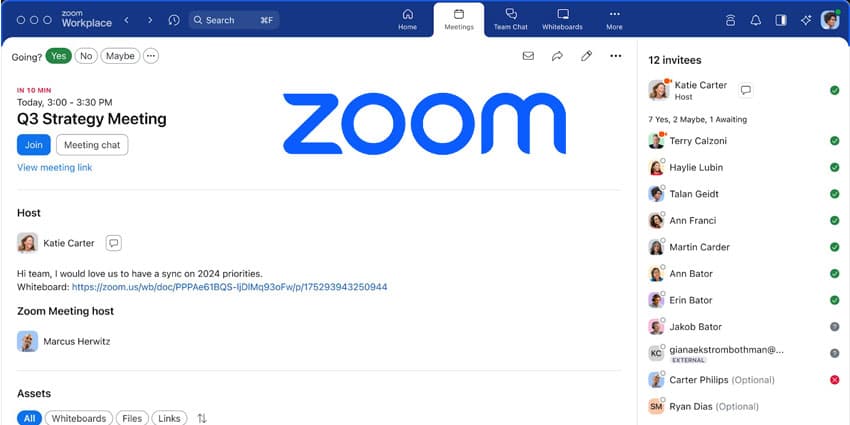
Users will soon experience a redesigned Meetings tab, offering all meeting-related information and assets in one place for streamlined workflows. Integrated with the Calendar tab, it enhances collaboration before and after meetings. Users can view upcoming meetings, attendee lists, and pre-shared materials and initiate or access continuous meeting chats. Post-meeting assets remain easily accessible.
Furthermore, users can choose from four colour themes or the classic Zoom dark or light mode. They can also customise the toolbar for easy access to preferred features.
Zoom Meeting attendees now enjoy a new multi-speaker view, automatically adjusting the video layout to highlight active speakers for more effortless follow-up. Meanwhile, document collaboration allows selection of third-party documents, simplifying access and enabling real-time co-editing.


