Migrating to a new UC platform seems like it should be a simple process: stop paying for your old licenses on Monday, start paying for the new ones on Tuesday. Unfortunately, we’ve spent too much time talking to vendors and buyers in this industry to think that’s how it really works.
Brinks, for instance, managed to move more than 220 branches to Webex calling in 60 days, but they still had to think about keeping a SIP trunk connecting its old and new systems while the switchover happened, as Paul Brookshire, Sr. VoIP engineer, said:
"Our main concern was how do we migrate over 220 branches without affecting the customer and our end users?"
There’s no flipping a switch here, even if your current platform’s already based in the cloud and you don’t have to go through all that legacy telephony switching nonsense. You’ve still got to find a new platform that does everything your old one can do (better), set up the architecture, think about co-existence to avoid unwanted downtime, and port huge amounts of data. Then there’s all the testing and training to think about too.
If UC migration planning is already giving you a migraine, here’s everything you’re probably going to need to tackle over the next few months.
Key Takeaways:
-
Start with an inventory of everything you already have, including the number of users, numbers, rooms, integrations, records, and bonus features.
-
Compare your migration options, from PBX-to-cloud migration to platform-to-platform migration, and keep a coexistence strategy in mind.
-
Prove the new system is ready in a complete pilot before you even think about switching anything off, and set up a rollback strategy if needed.
-
Keep tracking the value of the migration after you’ve made the move, and don’t assume that everything will pay off immediately.
What Should You Audit Before Planning a UC Migration?
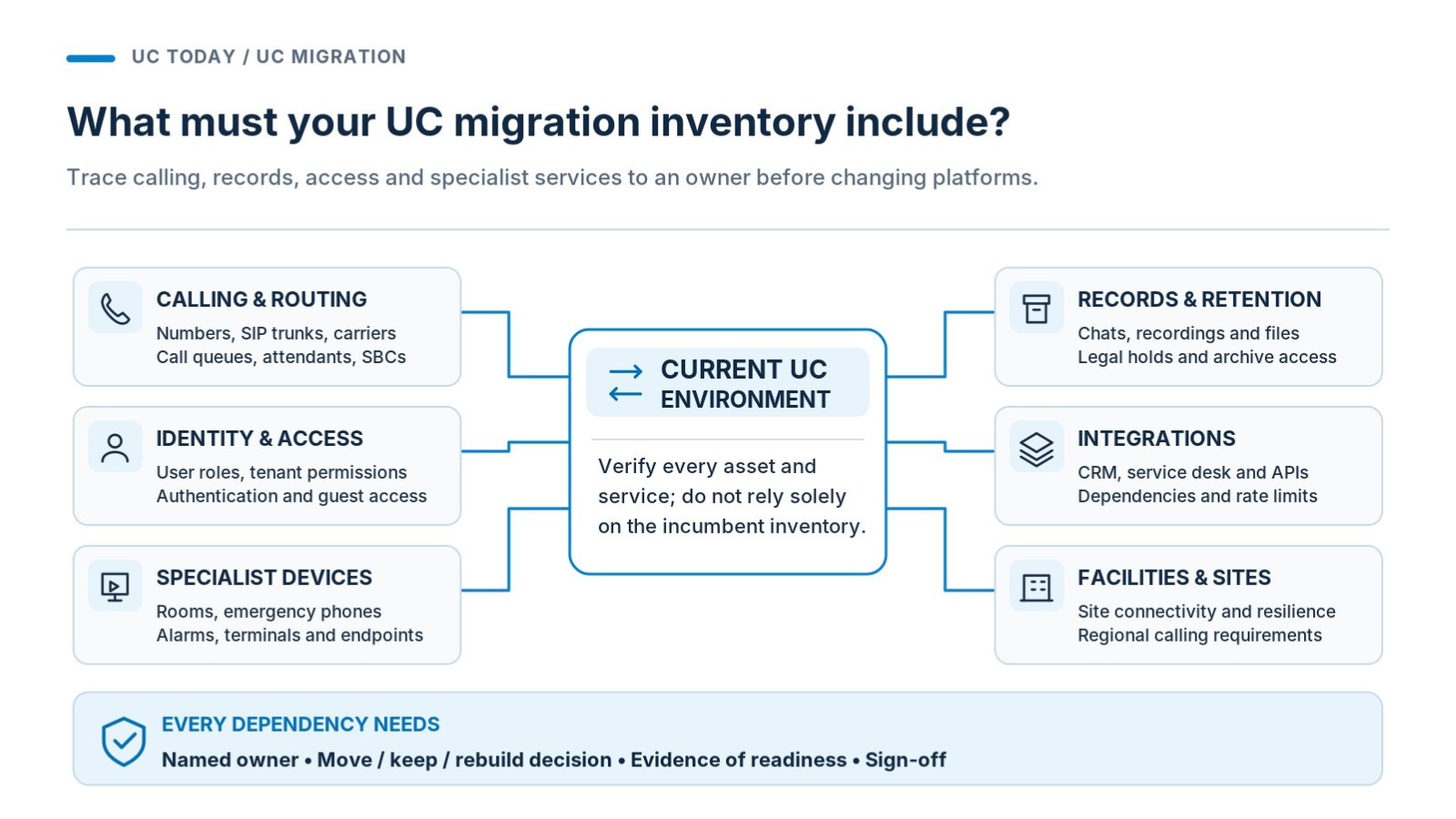
Every migration should start with a rather boring, and sometimes extensive bit of auditing work. If you don’t know exactly what you have now, how are you planning to ensure you get the right results on your new platform?
Start with the complete communications estate, which means making a list of every current user (and their permissions), phone numbers, SIP trunks, call queuing software, room systems, and the integrations that everyone absolutely can’t live without.
Also collect all of the data you’re going to need to take with you, like your messaging histories (up to a certain point), recordings, retention policies, and carrier contracts.
Then, and this is crucial, actually verify that the records you have are correct. North Warwickshire and South Leicester College said when they moved to Teams Phone, they discovered their previous provider didn’t actually know how they’d routed some of the numbers.
Decide What Stays, Moves, or Needs Rebuilding
Once you’ve got your list, it pays to spend a little time thinking about whether you want to replicate the whole thing exactly on the new platform, or change a few parts. You’ll probably port all of your existing numbers, user profiles, and compliance records onto the new platform without making any changes at all. You might even keep your current phone carrier, devices, and specialist SBCs.
On the other hand, you might want to get rid of tools you don’t use anymore, integrations that nobody really needs, or endpoints that are becoming increasingly out of date anyway.
The amount of things you need to rebuild will usually depend on the type of migration you’re making. If you’re moving into the cloud for the first time, you might need to redesign mobility and security strategies for hybrid workers, update call flows and attendants, design new API strategies, and rethink recording and storage policies.
A quick example:
|
Asset or dependency
|
Owner
|
Decision
|
Evidence needed
|
|
Main customer number and routing
|
Voice team
|
Move
|
Ownership and routing verification
|
|
Message archives and recordings
|
Compliance
|
Preserve
|
Retention and retrieval requirements
|
|
Meeting room equipment
|
Workplace IT
|
Assess
|
Compatibility and feature requirements
|
|
Elevator emergency phone
|
Facilities
|
Replace or retain
|
Device and connectivity assessment
|
Check the Services Nobody Thinks of as UC
We talked a bit about this in our article about the “Last-Mile Trap”, but if you are making the rather large jump from PSTN into the cloud, then there are quite a lot of things you can quite easily miss. A carrier invoice can show you a bunch of circuits without really telling you which equipment uses them, so you could end up with a defective fire alarm or payment terminal.
It’s usually helpful to spend a little time talking to facilities and security teams about the things they use every day, so you can double-check whether anything essential might be affected by your migration.
Which UC Migration Strategy Makes the Most Sense?
That really depends on the extent of the migration process. The strategy you use to move from one cloud-based platform to another because you want to standardize your collaboration platforms won’t be the same as the one you use for a full cloud migration.
You also need to think about how much of your existing infrastructure needs to stick around, and how you’re going to handle interoperability long-term.
The most common migration routes are:
|
Migration route
|
Best suited to
|
Main concern
|
|
PBX to UCaaS
|
Replacing aging phone infrastructure
|
Legacy devices and specialist calling
|
|
UCaaS to UCaaS
|
Switching cloud collaboration providers
|
Data portability and feature parity
|
|
Hybrid migration
|
Businesses with regional or specialist requirements
|
Managing overlapping systems
|
|
Calling-model change
|
Keeping a collaboration platform but changing PSTN providers
|
Routing and supplier responsibilities
|
Naturally, migrating fully from a PSTN system into the cloud generally does take a bit more work, even if the cost of retaining a legacy PBX is way too much for companies to overlook.
Still, don’t assume that platform-to-platform migrations will have absolutely no issues. If you’re moving from Microsoft Teams to Zoom, for instance, you may still need to deal with problems surrounding chat history, recordings, and Microsoft 365 connections you simply can’t lose.
Different users might have different requirements from the migration, too. When Ford moved nearly 170,000 employees into Teams, it decided to let its employees choose between 30 days, 90 days, and a whole year of activity history, and bring their own custom connectors into the system. Executive Justin Hamilton told us:
“We had several collaboration tools, and each group was deeply invested in their own,”
Decide on Your Coexistence Strategy
In some cases, businesses move most of their employees into a new platform, and keep licenses for old tools around for the employees that need them.
If your new platform mostly does everything your team needs, but doesn’t handle a couple of specialist things only a few people depend on, that might be a good option. It can also be helpful if you want to avoid vendor lock-in and have a fallback for mission-critical voice if something goes wrong with your main system.
If you do decide that you’re migrating everyone, you’re still going to need a temporary coexistence plan. Deciding to cancel everything in your old system one day and start using the new toolkit exclusively the next makes disruption a lot more likely.
A phased migration, on the other hand, lets you give specific groups of users a chance to test the new system, get used to it, provide feedback or suggestions for fixes, and potentially even train new users. You also get an opportunity to pinpoint any regional carrier issues or workflow problems you might have missed when you were evaluating the new platform.
You can decide for yourself how long you’re going to use the two systems side by side, and what each phase includes; just make sure you know how much extra coexistence is going to cost you.
What Does a UC Migration Really Cost?
It’d be a lot easier if there was some universal price list for what it costs to move from a legacy system to the cloud, or from one UCaaS platform to another. Unfortunately, there isn’t one, because there are really too many variables at play. The type of migration, how many users and licenses you’re porting, and even the amount of data you need to transfer all make a difference.
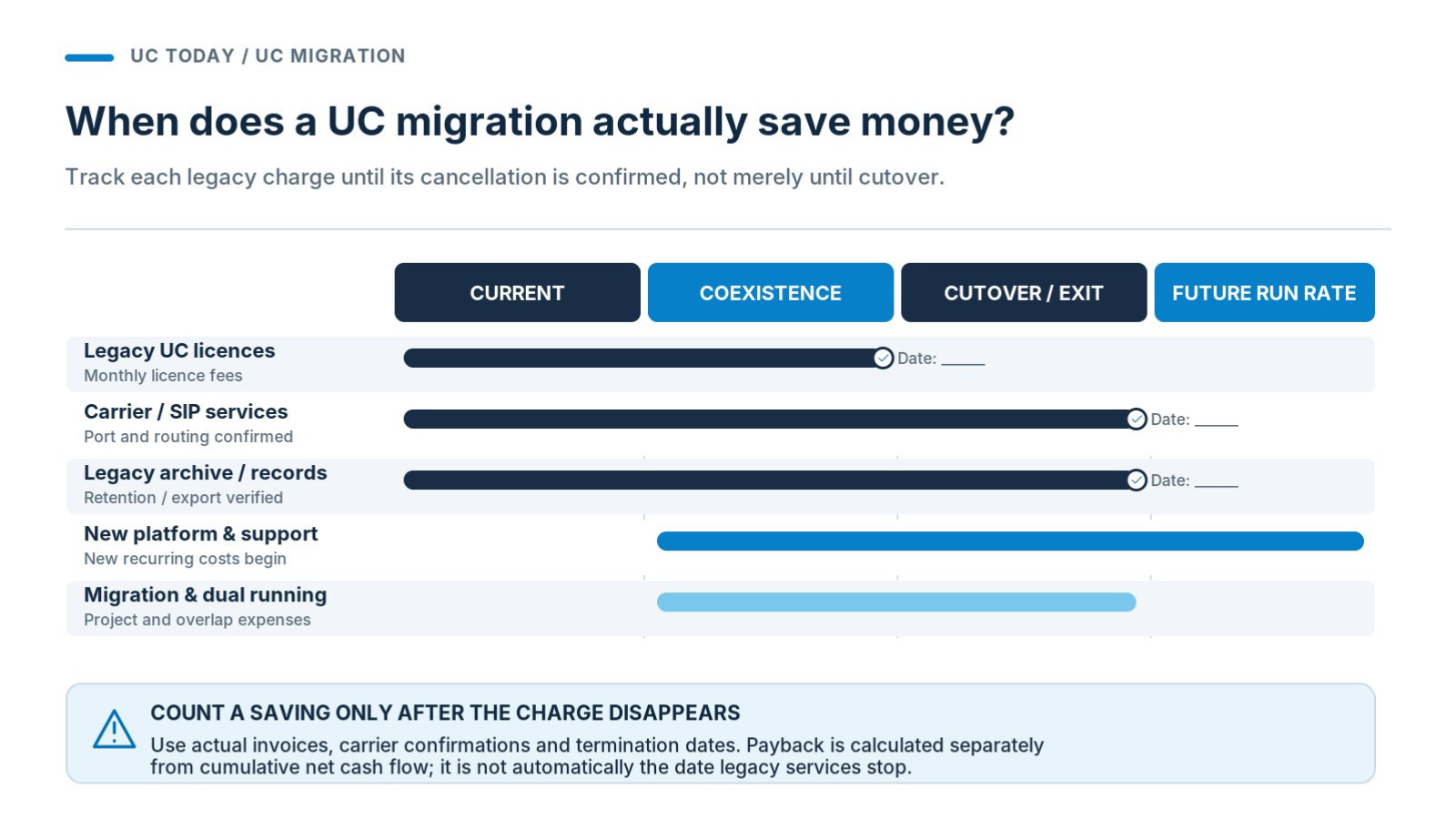
If you’re trying to figure out your UC migration TCO, don’t just account for how much each Teams Phone license or Zoom subscription costs; track everything involved in the move.
That might mean thinking about engineering, the professional services you need to pay for, porting fees, session border controllers, replacement devices, data extraction, compliance archiving, training, and additional support through the whole thing.
Paying for expertise can be particularly expensive now, if you’re still moving legacy systems, as Gamma’s Ed Savory told us:
“The skillset of engineers who maintain these older systems is becoming more scarce, and sourcing replacement parts is expensive, if not impossible.”
Getting Ready to Prove ROI
Your TCO calculations should give you a baseline for what you’re paying now, which comes in very handy when you want to prove that the migration was worthwhile later on.
Create a document that covers all of these things:
|
Cost stage
|
What to verify
|
|
Current baseline
|
Licenses, carrier invoices, maintenance contracts
|
|
Migration expenses
|
Engineering, equipment, porting, training
|
|
Dual running
|
Overlapping charges and expected duration
|
|
Future operating costs
|
Subscriptions, consumption, support
|
|
Legacy retirement
|
Contract termination dates and final invoices
|
Then, when you’re fully migrated, compare the new baseline to the old one, and see if you’re saving enough (long-term) to make all of that extra expense for dual running and migration fees worth it.
Keep in mind it might take a while to see the payback, so it might be helpful to try and estimate what you might save after three to five years of running the new system, compared to the old one.
How Do You Test Whether Your New UC Environment Is Ready?
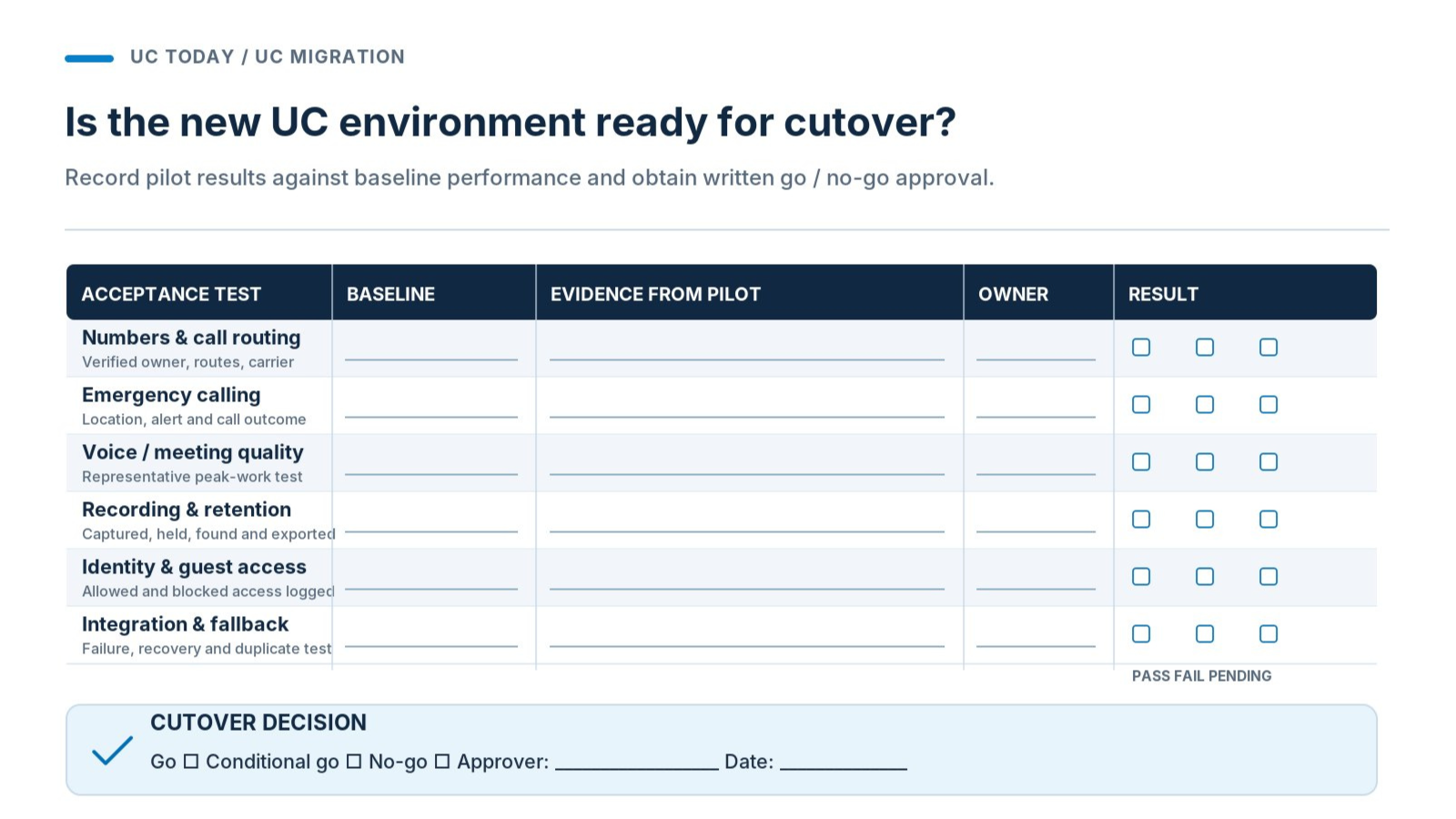
One of the worst things an organization can do is spend months on UC migration planning, then jump straight into a new platform without checking everything works as they expected.
A demo can show you that users should be able to log in and make a test call; a pilot needs to give you a chance to see what happens during day-to-day work.
Build a strategy around real users and workflows. That generally means choosing participants who are probably going to have different requirements, like remote workers, branch employees, people using shared devices, and teams that have very specific risks to think about when recording calls or meetings.
Get each of those people to work through the tasks they’d usually do with their own system and make a note of anything that has trouble. Be extra careful with checking:
-
Network and infrastructure stability for both voice and video
-
SIP, RTP, and WebRTC connections
-
Call routing and business numbers
-
Call handling features (for external calls)
-
Messaging and meeting functionality
-
Concurrent calls and meetings on the same platform
-
Authentication and permissions
-
Recording, legal holds, retention, and retrieval
-
Guest access and interoperability
-
Integrations with external tools
Test What Happens When Things Go Wrong
It’s surprisingly helpful to try and force a few things to go wrong too. See what happens when the network isn’t working as it should, or when lots of different employees try to make a call at once. Check emergency calling carefully too, as Alex Kugell, the CTO at Trio told us:
“In an IP voice world, emergency calling becomes a systems problem, rather than a telecom problem.”
In the US, for instance, you need to make sure your systems address direct 911 dialing, notifications, and dispatchable locations under FCC guidance on Kari’s Law and RAY BAUM’s Act. In the UK, on the other hand, Ofcom condition A3 covers emergency access and caller-location duties, while B3 addresses number portability.
Don’t let any UCaaS risks go overlooked before you agree to continue with the migration.
It could also help to set some things up for the long term during this stage. If you’re worried about keeping an eye on how everything’s working, a service management platform could be a good investment.
How Do You Manage Cutover Without Disrupting Communications?
The best option is to move in phases and make sure that you have a backup plan in place for when you inevitably meet some kind of stumbling block. If you’re managing the migration gradually, start with smaller, less essential sites first, and use the results you get from those to check your assumptions are actually right before you move to more demanding locations.
Even for those smaller sites, keep the essential services available using your coexistence strategy, and freeze configuration changes before each wave. We covered a CallTower case study of a Florida Bank that used this approach, and Chief Revenue Officer of CallTower, William Rubio, reminded us of the value of an approach that:
“always kept the old system live until the new one was fully validated.”
|
Cutover requirement
|
Evidence required before approval
|
|
Calling readiness
|
Carrier confirmation and verified number routing
|
|
Critical services
|
Emergency calling and recording tests passed
|
|
Technical readiness
|
Current configurations checked, monitoring active
|
|
Recovery
|
Fallback routes tested and escalation contacts available
|
|
Business readiness
|
Support teams briefed, business owner approval recorded
|
Know When to Roll Back, Reroute, or Stop
A migration can sometimes feel a bit like a boulder rolling down a hill, but you do need to find a way to stay in control (as much as you can).
First, make sure you know what you can actually reverse or reroute. If your original system is still running alongside your new one, you can probably redirect calls if something goes wrong with the new platform pretty easily, but recovering from a completed number port involving another carrier can be a lot more complicated.
Make sure you have a strategy in place for identifying the last safe recovery point you can return to for each wave of the migration, and an action plan for failed emergency routing, missing recordings, or major failures that should trigger a pause.
Establish Who Owns Each Supplier Handoff
It’s easy to lose track of everyone that’s actually involved in a UC migration sometimes. Your carrier engineers can confirm a port, and UC vendors can verify platform availability, but you still need someone who can establish if communications are happening smoothly.
Assign at least one enterprise cutover owner to the project with final authority over making decisions, hopefully supported by named contacts across the carrier, vendor, integrator, and your internal IT teams. While you’re doing that, also make sure someone’s responsible for keeping your staff informed. Your employees need advanced notice of when things are going to change, what they should do if they see a problem, and what to do if their typical communication channels fail.
It’d be nice to say, “when you’re sure everything’s stable”, but you might never reach a point when you’re that confident. That doesn’t mean, however, that you should immediately ditch your old platform the moment everyone on your team has a new license.
Take some time to monitor everything with your ITSM tools, find out whether people are still trying to revert to the old system regularly, or whether, when they encounter a problem in the new one, they have an easy way to fix it.
A lot of vendors offering migration assistance will be able to offer a dedicated support period after your official “cutover” date, and that’s worth holding onto. Collaborate with that support team regularly to find out if there’s anything you still need to fix before you call the migration complete.
Once you do feel like everything is working smoothly (at least for the most part), talk to everyone from your IT operations team, to department owners, compliance staff, and finance, and confirm that there are no additional concerns hanging around.
FAQs
How long does a unified communications migration take?
There’s no vendor that can really give you a definitive timeline here, because there are too many factors to consider. If you have a small office moving from one UCaaS platform to another, and everything’s properly documented, the migration could be relatively quick. If you’re moving an entire global business reliant on legacy systems into the cloud, that’s another story.
For the most part, but don’t assume that everything will automatically transfer as neatly as you’d like. Chat histories, recordings, files, and meeting configurations can all have different restrictions to think about, so keep a close eye on what needs backing up and rebuilding before you start.
Do all users and phone numbers need to move at once?
No, and that’s probably one of the riskiest ways to approach a migration anyway. A phased rollout where one solution keeps running alongside the old system for a while can help you avoid disruptions and spot potential problems before they disrupt your whole business.
What are the biggest hidden costs of UC migration?
None of the costs are really hidden, just forgotten about. You might be paying for running two systems at the same time, specialist equipment, extra professional services, data extraction, and even legacy contract penalties if you’re cancelling early.
What happens if number porting or cutover fails?
Ideally, you’ll have a UC migration rollback strategy in place. Fallback routing might restore service, but complicated number ports aren’t always easy to reverse. Make sure you’re clear about recovery responsibilities and escalation procedures with carriers before the cutover.