As boastful as it might sound, here at UC Today, we like to think of ourselves as one of the early pioneers of hybrid working; we’ve been offering it for years, even before the pandemic. Still, we’re not about to suggest that there aren’t things we’re still figuring out. We’re clearly not alone there.
Even though, as CIPD says, three-quarters of employers are offering hybrid work options, a lot of them are still struggling with company culture issues, problems with varied access to different technologies, and countless other issues.
As Dr Kate Barker, the Chief Futurist at NEOM, said:
“Hybrid work has introduced what I describe as a coordination tax”
We think the problem probably comes down to the fact that a lot of companies have accepted hybrid work as an option, without taking the time to actually think about how they’re going to make the whole thing workable for their employees. So here’s the blueprint we’d recommend using.
Key Takeaways:
-
Hybrid arrangements should vary based on the work that people actually do; one specific office schedule might not make sense for every team.
-
Figure out the basics early, from communication norms for remote and hybrid teams to availability requirements, and make sure they’re realistic.
-
Prioritize real equity between employees: everyone should have access to the technology, information, and meeting experiences that they need, regardless of whether they’re in the office.
-
Build habits that help your teams, and measure how they’re paying off properly with a careful list of productivity and performance metrics.
Companies can decide to approve hybrid working models, then jump into buying a whole set of tools surprisingly quickly, often without thinking much about the problems they’re actually going to need to address. We’ve talked before about how easy it is for a collaboration stack meant to support a hybrid team to become a distraction.
Before you start buying things, you need a clear idea of where things could potentially go wrong when your employees aren’t always in the same building at the same time.
For instance:
|
Issue
|
What to investigate
|
|
Decisions keep getting revisited
|
Missing records or unclear decision rights
|
|
Projects stall between teams
|
Poor handoffs and missing ownership
|
|
Office days accomplish little
|
Teams attend on incompatible schedules
|
|
Meetings keep multiplying
|
Unnecessary updates or unresolved decisions
|
|
Remote employees feel excluded
|
Informal decisions and unequal access
|
You can find those problems pretty quickly if you’re actually looking for them, but as Gallup found, about 48% of hybrid workers never discussed a team collaboration plan before the model was introduced, so they had no idea what they should be watching out for.
Does Your Hybrid Model Actually Match the Work?
Another thing to settle early is what your hybrid model’s going to look like, and whether it accounts for the different needs of everyone in your team.
Fixed office days can seem like a handy way to give everyone a predictable schedule, until someone turns up for their assigned Wednesday and they can’t reach the person they need to collaborate with face-to-face. Flexible hybrid arrangements generally give employees more choice, so they can choose when they need to attend the office based on the work they’ll actually be doing.
Of course, that doesn’t guarantee that you won’t have blips along the way. You don’t have to marry the first hybrid strategy you choose. Sometimes it helps to run a few tests, use interviews and workflow evidence, and ask yourself which strategies should continue, and which shouldn’t.
Write a Hybrid Team Working Agreement
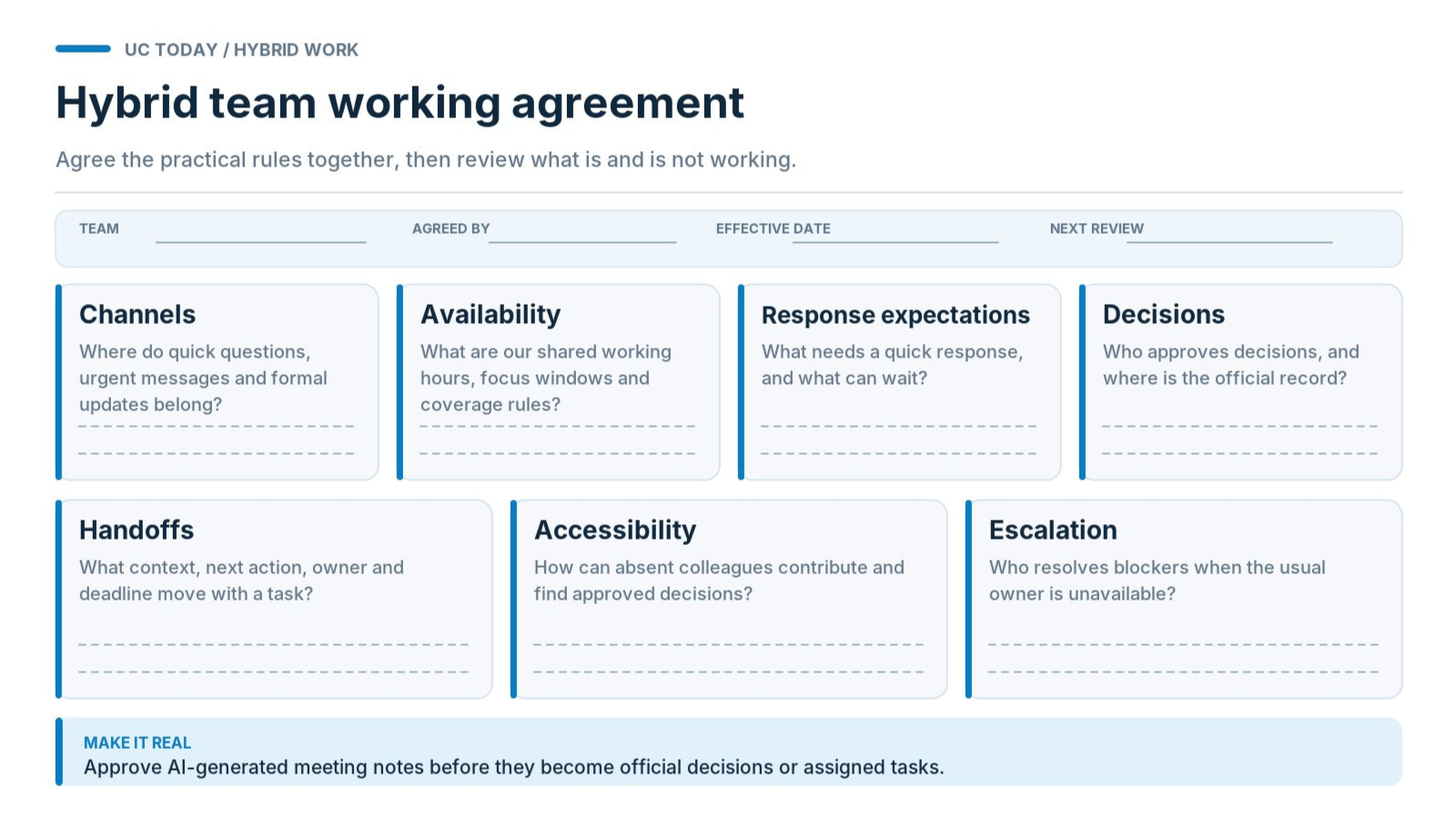
Deciding what “hybrid” should mean for your team gives you a good starting point for figuring out if you’re going to have fixed in-office days (even for certain employees), full flexibility, or a remote-first model, but you still need to iron out the little details.
A hybrid working policy sets out the official boundaries for things like attendance requirements and eligibility, but a working agreement deals with the everyday details like when people absolutely need to be available, when and where decisions get made, which channels people should typically choose for specific tasks, and so on.
Companies should be writing these agreements with their employees, not just imposing catch-all rules. Gallup found that 55% of employees who were allowed to make joint decisions on their policy reported better results with collaboration.
What Should Your Hybrid Team Agreement Include?
It depends partially on how your people work, communicate, and collaborate in the first place, but at a minimum, you’ll need to figure out:
|
Element
|
What the team needs to agree
|
|
Channels
|
Where questions, urgent issues, and formal updates belong
|
|
Availability
|
Shared working hours, focus time, and absence coverage
|
|
Response expectations
|
Which requests need immediate attention and which can wait
|
|
Decisions
|
Who approves decisions, where they're recorded, and who must be informed
|
|
Handoffs
|
What context transfers with a task and who accepts responsibility
|
|
Accessibility
|
How employees participate when they can't attend live
|
|
Escalation
|
Who resolves blockers when the usual owner is unavailable
|
Even if the exact agreement differs from one employee to the next, it’s worth keeping one “standard” policy for the major stuff, like which channels employees should be using and updating; otherwise, you can end up with a communication strategy that gradually mutates between teams.
Decision rights should be pretty consistent too, since people can contribute to a decision without having authority to approve it, and that can easily lead to bottlenecks in hybrid work.
Also be very specific about how every employee uses AI and automation. Sometimes, as Daniel Burrus told us,
“There are people that can’t always make a meeting.”
That can happen even if that person is scheduled to be in the office on a specific day, which usually leaves people relying on AI to catch up and sort through notes. When that happens, you need to make sure those notes are properly approved before they become official records or assigned tasks.
Who Should Create and Maintain the Agreement?
Leaders and their people, hopefully. There’s a good example from the RSPCA; its Hello Hybrid resource provides shared guidance, but managers and teams agree together on arrangements that suit their work, and employees make sure to keep their calendars updated, too.
That’s a good sign that, as Jeremy Gautery-Jones told us:
“We trust our people to work flexibly.”
Choose Asynchronous or Live Work Deliberately
One of the most challenging parts of building a hybrid work blueprint is figuring out when your teams need to be working together at the same time, and when they can operate on their own schedule.
Sometimes meetings and real-time collaboration are absolutely necessary, especially if two people are working on a project at the same time, with the same deadline. Other times, there’s nothing stopping your employees from working independently.
Ravin Jesuthasan, Global Leader for Transformation Services at Mercer, gave pretty good advice when he said:
“The basic idea is that work is deconstructed into its core elements: tasks and activities. That allows companies to more efficiently and effectively find the optimal means of completing a particular task and to match them to the required skills.”
When Should Teams Work Asynchronously Instead of Meeting?
In our article on mixing async and real-time work, we said that sometimes a meeting can just create the illusion of momentum. If live calls are just letting people end a meeting feeling productive, even though nothing gets done, you’re not getting very far.
Async work is perfect for those simple tasks that don’t need another person’s input immediately, like research or routine project updates; demanding meetings for those things just adds to unnecessary communication overload.
On the other hand, if you have an urgent incident or complicated disagreement to work through, maybe a meeting is the best bet.
I’d use this as a starting point:
|
Task
|
Best approach
|
|
Routine progress updates
|
Async, with blockers documented
|
|
Reviewing proposals
|
Shared document with a feedback deadline
|
|
Complex disagreements
|
Live discussion with a decision owner
|
|
Urgent incidents
|
Real-time coordination
|
|
Approving completed work
|
Async, unless an issue needs discussion
|
|
Mentoring or relationship building
|
Purposeful live interaction
|
One thing you will probably need to think about when you’re managing a global team is time zones.
Microsoft’s 2025 Work Trend Index telemetry found that 30% of meetings spanned multiple time zones, eight percentage points more than in 2021. If you’re dealing with global employees, they shouldn’t need to guess whether a message sent after hours for them deserves an urgent reply.
Use agreed response windows where you can that everyone can understand, and create an emergency route for things that really need to be addressed straight away.
Also make every substantial handoff answer a few questions: What's happened? What's been decided? Who makes the next decision, and who's responsible for acting on it? When is the deadline?
When Is In-Person Collaboration Worth the Commute?
There are times when even having a few people online at the same time or connected via a meeting app still doesn’t get the job done. A lot of the things that used to require in-person interactions, like workshops and mentoring, can now be done digitally for the most part, but there are still people who respond better to those things when they’re face-to-face with a team member.
Then there are the interactions that absolutely have to take place in-person, between people who are working on projects that need resources only your office can actually provide.
If meeting physically doesn’t help people accomplish something they couldn’t have done elsewhere, then you should probably reconsider asking them to make a commute just because you don’t want your office utilization rates to drop.
Make Meeting and Workplace Access Equitable
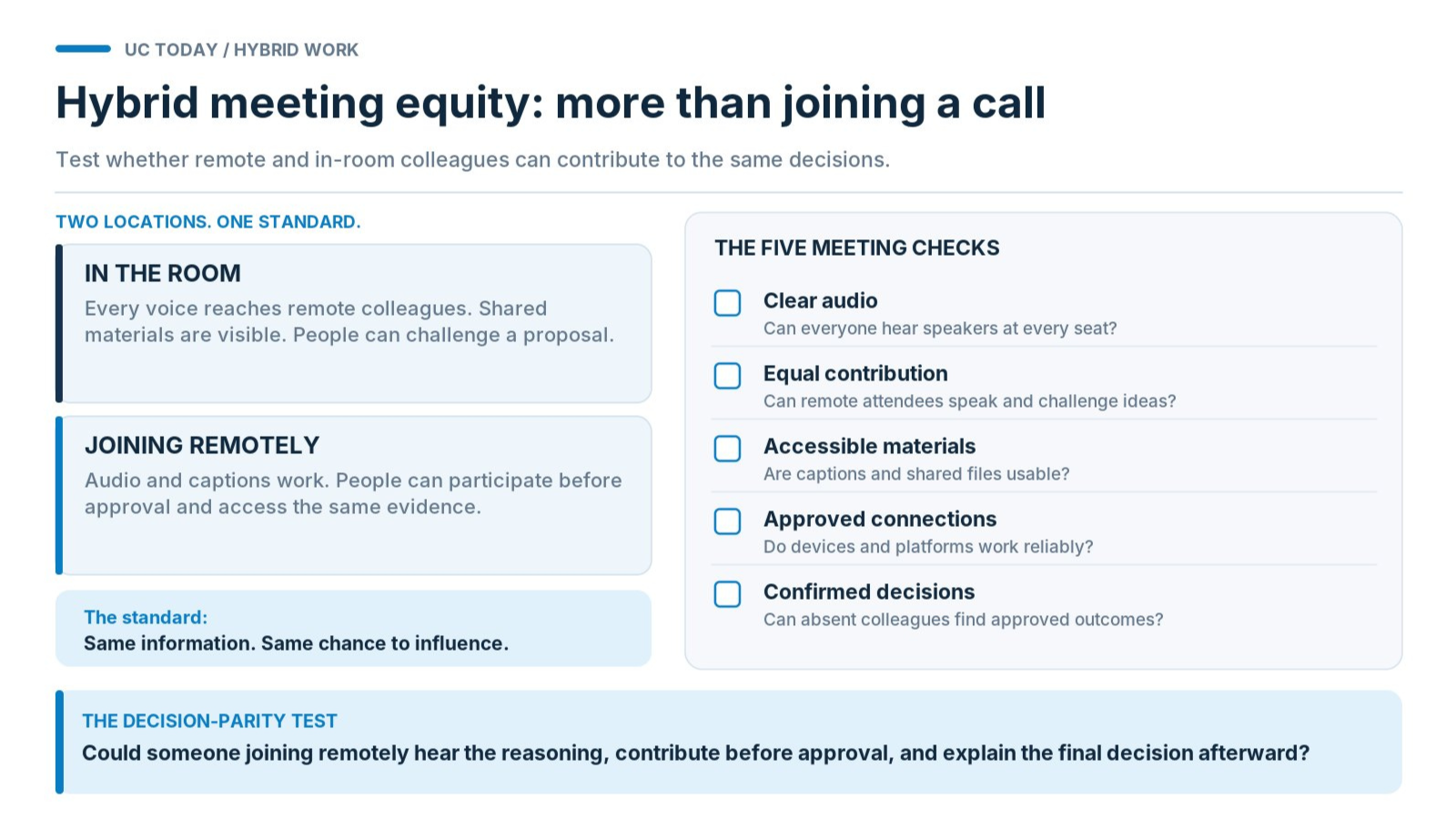
You can allow people to work remotely, or follow a hybrid schedule, and make it incredibly difficult for them to perform as well as anyone in the office. One June 2026 report from Jabra found that 75% of hybrid meetings experienced at least one technology failure, with problems costing an average of 11 minutes per meeting. That doesn’t seem like much fun for teams.
Before you assume that everyone’s getting the same experience in meetings just because they can technically join, check everything.
Can Every Participant Hear, Contribute, and Access the Meeting?
Start with audio, since that’s usually the foundation for good hybrid meeting equity. Poor microphone coverage leaves remote colleagues struggling to hear whoever’s sitting furthest from the equipment. Add background noise or overlapping conversations, and participating becomes exhausting.
Deborah Jones, AV/IT Sales Manager at the Queen Elizabeth II Center, told us:
“You still need sound, though, because guess what? You’ve got a thousand people online.”
Test every hybrid meeting setup against five questions:
-
Can remote participants hear everyone clearly?
-
Can they contribute without fighting for attention?
-
Are captions and shared materials accessible?
-
Does the meeting work across approved devices and platforms?
-
Can absent employees find the confirmed decisions afterward?
Also, remember that bad audio can damage AI transcripts and meeting summaries too, so it’s a good idea to get this figured out pretty quickly.
Does Everyone Have Equal Access to Decisions and Opportunities?
We’ve got a whole article about proximity bias here, and it’s still a common problem for a surprising number of teams. Even if everyone can hear each other in your meetings, and everyone shows up properly on camera, you’ve got a problem if the employees outside of the office don’t get much of a say in the decisions that get made.
You’ve also got the issue of dealing with decisions that were made when someone wasn’t actually in a meeting. Can they still understand what was decided and why, or what they’re supposed to do next based on your notes and AI summaries?
Who Resolves a Poor Hybrid Meeting Experience?
If something goes wrong with the experience, whether it’s a technology problem or an issue with networking, someone has to handle it. In most businesses, managers should own meeting practices, IT should handle access and service reliability, and AV teams should deal with acoustics and equipment problems. You’ll probably have a few people responsible for managing the physical equipment too.
Make sure there’s a clear way for every employee to report problems, and that every issue has a named owner responsible for dealing with it. Without that, you’ll probably start to see evidence of a pretty poor employee experience in your IT support tickets quite quickly.
Build Hybrid Work Habits Without Creating More Work
Honestly, we’ve all suffered through enough mandatory virtual coffee mornings and awkward team-building exercises designed to replace the watercooler moments of the old workplace. That doesn’t make all rituals and habits for the hybrid workplace pointless, though.
Small and familiar habits can really help people feel more connected, even if they don’t share the same physical space. The trick is to replace something valuable, not just add more noise.
Start with a few basics such as:
-
Async wins and blockers: Replace a weekly status meeting with a short Teams or Slack update. Everyone can flag problems without surrendering another hour to their calendar.
-
New-hire buddy check-ins: Give new employees someone they can ask the slightly embarrassing questions they don't want to bother their manager with.
-
Shared learning moments: Spend ten minutes discussing a useful customer insight or recent project lesson, instead of scheduling another lengthy training session.
The RSPCA provides a good example of knowing when to stop. According to CIPD's 2025 case study, the charity successfully trialed meeting-free Fridays but found that a workplace social app wasn't being used. Sensibly, it didn't keep pushing the unsuccessful experiment.
How Do Managers Build Connection Without Forcing Participation?
Andrew Tiscoe, Commercial Excellence at Kahoot, once told us:
“If you want better business results, you have to equip leaders to build actual human connection.”
In other words, if you want managers to actually help strengthen the culture in your hybrid workplace, you need to train them on how to do that.
Give them a basic idea of what they should be doing regularly, like checking in on team members (not just following up on their progress), and encouraging activity in group meetings. But also don’t force managers to push people into routines they’re not comfortable with.
Cameras should probably remain optional where possible, and employees should have the freedom to contribute asynchronously and rotate responsibility for organizing activities when it makes sense. Nobody should feel obliged to disclose personal difficulties during a team check-in.
Get managers to regularly review whether each ritual or habit is still useful too. If employees dread it, change it or drop it.
Measure, Review and Improve Hybrid Work
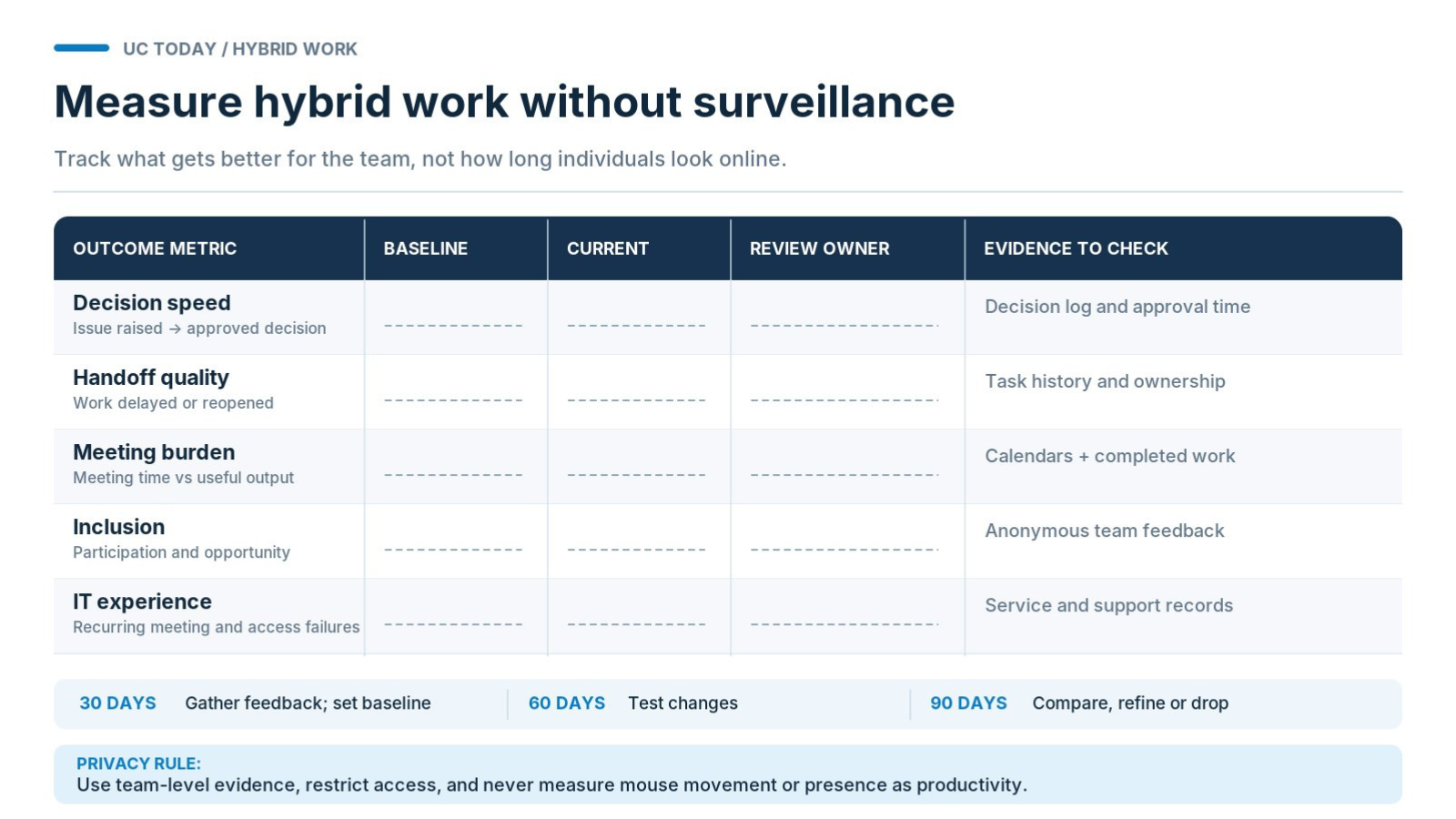
I don’t really understand why companies invest all that money into collaboration analytics, and still judge the success of a hybrid strategy by how many people show up in the office, and how often they actually attend the meetings they’re supposed to go to.
Your hybrid work blueprint should have pre-defined ways of finding the proof that collaboration is improving, and there are a few metrics you should track for that:
|
Metric
|
What to measure
|
|
Decision speed
|
Time between raising an issue and reaching an approved decision
|
|
Handoff quality
|
Tasks delayed or reopened because information was missing
|
|
Meeting burden
|
Time spent in meetings relative to decisions and completed work
|
|
Inclusion
|
Employee feedback on participation and access to opportunities
|
|
IT experience
|
Recurring connectivity, meeting, and access problems
|
How Do You Measure Hybrid Work Without Employee Surveillance?
Now here’s the tricky part: gathering the right metrics without making employees feel like they’re constantly being watched. You shouldn’t need to track mouse movements or Teams availability to ensure that everyone’s doing well. That really just shows you how good people get at convincingly performing productivity.
Hybrid work without surveillance means examining team-level problems, restricting access to sensitive information, and explaining exactly what data is collected.
Rob Lay, CTO for Cisco UK & Ireland, told us:
“If our users and our customers’ users don’t trust the technology, then they won’t use it.”
What Should Organizations Review After 30, 60, and 90 Days?
I’d actually keep reviewing after 90 days, but for the first few months, here’s the basic focus:
-
30 days: Gather feedback and establish baseline performance.
-
60 days: Test changes to working agreements and meeting practices.
-
90 days: Compare results, investigate complaints, and abandon activities that aren't helping.
Remember that ownership is important for anything that needs to change, too. Maybe give one workplace sponsor responsibility for coordinating changes, while managers handle daily working practices. Try to avoid turning every tiny change into a massive issue; otherwise, change fatigue could end up driving your team into the ground.
Make Hybrid Work A Success
Time has successfully proven that hybrid work isn’t a limited-time fad, even if companies still do try to get employees back into the office more often from time to time. A hybrid model can still be a brilliant way to improve employee productivity, reduce the risk of burnout, and keep future generations of staff happy; you just need a plan for how you’re going to run it.
Build your hybrid work blueprint stage by stage, finding the areas where people are most likely to get stuck, developing working arrangements with the employees who are actually going to use them, and experimenting with rules and strategies as you go along.
Then, keep an eye on meeting equity, overall productivity, and what parts of the model your employees need fixing.
FAQs
What Makes a Hybrid Work Model Effective?
A good hybrid work blueprint makes collaboration predictable, wherever employees work. People should know where information lives, who makes decisions, and how to get help. If everything falls apart when someone's working from home, the system needs attention.
What Should a Hybrid Team Working Agreement Include?
Your hybrid team working agreement should cover communication channels, availability, response expectations, decision ownership, and escalation procedures. Keep it practical. Nobody wants another 20-page policy document they'll never read.
When Should Hybrid Teams Use Async Communication Instead of Meetings?
Use asynchronous collaboration for routine updates, document reviews, and straightforward approvals. Schedule live conversations when disagreements need resolving or decisions require discussion. Every meeting should have a purpose beyond filling someone's calendar.
What Are the Biggest Mistakes Organizations Make With Hybrid Working?
Mandating office attendance without explaining its purpose. Letting managers invent conflicting hybrid work communication norms. Assuming employees will figure out collaboration problems themselves. These mistakes create frustration that better software alone won't resolve.
How Should Organizations Measure Hybrid Work Productivity?
Focus on completed work, decision speed, handoff failures, and employee feedback. Useful hybrid work productivity metrics show whether collaboration is improving. Hybrid work without surveillance is perfectly achievable when managers assess results instead of watching employees' online status.