Welcome to the modern workplace, where every conversation you have comes with risks, rules, and often a handful of regulatory requirements attached, even if you’re just talking to your AI copilot.
Plenty of companies still don’t realize how difficult it can be to ensure secure and compliant communications across your entire ecosystem. Some even think they just have to worry about conversations with customers, which is how they end up facing fines they never thought about.
These days, a regulator can come to you asking for a complete record of how a sensitive business decision was made, and you’d need to show that you made the right calls through each Teams meeting, chat message, and AI-generated summary. That can be pretty complicated.
If you’re starting to get nervous, this guide is here to help you better understand what security and compliance really mean in communications, map the risks you might be facing, verify that you’re using the right controls, and ensure you’re ready to hand the right proof to the right people.
Key Takeaways:
-
Security in communications is about the work you do to protect accounts, conversations, and the systems carrying them, while compliance deals with what your organization needs to produce, record, retain, or supervise.
-
A good strategy needs to cover everything from the policies you use in different channels to the controls you have in place for endpoints, identities, and guests, and the work you’re doing with recording, archiving, and governing AI.
-
Every security and compliance strategy needs testing regularly, and every vendor should be able to provide proof that they can accommodate your standards.
-
All of this work is unfortunately ongoing, particularly as regulations change, new AI tools come into the mix, and systems get more complicated.
What Communications and Data Do You Need to Protect?
More than just the conversations you have with customers or external parties. There are plenty of sensitive discussions that can happen through UCaaS platforms, ranging from discussions about hiring and promotion to chats your team members have about new products with protected IP.
Build yourself a comprehensive map of all the staff calls and conversations that happen across audio, video, chat, and through side tools like integrated apps or AI assistants. You should end up with a complete list of meetings, recordings, shared documents, mobile messages, and AI outputs you probably need to protect.
Be very careful about searching for Shadow IT and Shadow AI, too. Don’t just assume your employees are using the tools you’ve asked them to stick with; some might even be forced to communicate with contractors or suppliers using external tools.
Companies can end up paying serious fines because they’re unaware of people using unsanctioned apps, as Irwin Lazar noted when talking about a particular incident:
“Because all of that was happening using non-approved applications, there was no recordkeeping, no capture, no archive.”
Your security strategy needs to account for everything. Every single identity, conversation, and app that might need extra protection from anything from account takeover to phishing, vishing, malware, misconfiguration issues, and dependency failures.
Which Laws and Industry Requirements Apply?
Security in communications deals with the things you do to capture and protect conversations, data, and employees, while compliance makes sure you’re staying on track with relevant laws.
Obviously, the exact laws and regulations you’ll need to think about differ depending on where you’re based in the world, and the industry you serve. Some of the common ones include:
|
Regulation
|
What buyers need to establish
|
|
SEC / FINRA
|
Which financial communications require retention and supervision?
|
|
MiFID II
|
Are relevant investment-related calls and messages recorded?
|
|
UK / EU GDPR
|
Are processing, monitoring, retention, and international transfers lawful?
|
|
DORA
|
Which ICT resilience and supplier obligations apply to covered financial entities?
|
|
NIS2
|
Does national implementing legislation impose additional cybersecurity obligations?
|
|
Other sector rules
|
Do healthcare, government, or industry-specific requirements apply?
|
Some of these rules can be pretty specific; for instance, in June 2025, ESMA clarified that any investment conversation intended to result in a transaction would also need to be recorded, even if that transaction never happens.
There’s also the AI compliance factor to think about. Even if it’s a machine, not a person, that’s generating summaries or content that includes sensitive data, you still need to make sure that information’s protected. You also still need to show some accountability for what happens when an AI assistant or agent sends information to the wrong person or makes an incorrect suggestion.
Sensitive data can easily leak out of your collaboration tools through an AI tool that’s being a bit too frivolous with data it shouldn’t really have access to.
Which Security Controls Matter Most?
Again, this depends on quite a few things, but there are some pretty obvious controls that tend to apply everywhere. Identity and internal sharing controls are one example. You can apply encryption to everything, but that still won’t help if a colleague accidentally gives an attacker posing as IT support complete access to their team workspace.
Unfortunately, things like that happen pretty often now. In October 2026, Arctic Wolf analyzed over 400 incidents involving abuse of Microsoft Teams external chat, and found a huge number of cases where attackers impersonated support staff and occasionally convinced employees to launch remote access software. It said:
“Most organizations have no legitimate need for open, any-tenant external chat.”
Alongside identity and access controls, think carefully about:
-
Edge control and protection through Session Border Controls
-
Network segmentation for voice and data traffic
-
Tools for creating audit logs and tracking incidents
-
API and integration governance
-
Encryption for absolutely everything you need to collect and store
Don’t underestimate endpoint controls either; networked conferencing devices still need firmware updates to protect against attacks, restricted access, and appropriate network separation.
What Happens When Security Requirements Conflict?
Unfortunately, they sometimes do. Look at encryption, for instance: a lot of vendors promise absolute end-to-end protection, but your compliance team still needs to record certain conversations and might need to gain access to the decrypted content from time to time.
External collaboration can create conflicts too; you might have an employee who should have permission to share confidential information internally, but then an interoperability connector could accidentally carry that content into someone else’s workspace.
Puneet Bhatnagar, former Head of Identity Management at Blackstone, once told us that weakly governed bridges were essentially:
“Sanctioned shadow IT: officially approved, but insufficiently scrutinized.”
You can’t always prevent conflicts, but you can figure out where they show up, and make a plan for how you’re going to handle them as safely as possible.
What Evidence Proves the Controls Work?
If you’re sorting through UCaaS platforms with a genuine focus on security and compliance, remember that the fact that vendors might be able to show you a few certifications is really just a good starting point. There’s still a lot to consider (especially for companies in certain industries).
Run your own tests:
|
Security control
|
Ask the vendor to…
|
|
Identity and access
|
Show you what happens when you block an unauthorized guest or revoke an employee's access
|
|
Data protection
|
Demonstrate how they stop sensitive files from reaching an unapproved external workspace
|
|
Encryption
|
Identify who controls keys and who can access decrypted recordings
|
|
Audit and response
|
Produce access logs, suspicious-activity alerts, and incident escalation evidence
|
What Must Be Recorded, Retained, or Supervised?
This directs us more to the “communications compliance” side of things. You might invest in some kind of compliance software and assume the best thing you can do is record absolutely everything, because that way, you’re not caught out by an unexpected request in an audit.
Unfortunately, that strategy could end up getting you into a different kind of trouble when someone asks why you’ve been keeping hold of years’ worth of private employee discussions.
As the Information Commissioner’s Office said:
“It is not usually proportionate to monitor or record the content of calls in all cases.”
If you’ve been looking through the regulations that apply to your business, you should have a decent idea of the conversations you’re either required or permitted to capture.
You still need to make sure you’re clear about who can access those recordings, where they’re stored, and when they should be deleted. The rules for those things might change depending on whether you’re dealing with internal meetings, staff calls, or messaging, so keep that in mind.
Also, remember that AI can produce records you won’t always be able to keep track of. The 2026 Otter.ai privacy litigation case is a good example of the problems that can happen when an employee invites a third-party note-taker into a meeting.
Tate Hilmoe, Chief Legal Officer at Proto Hologram, told us:
“When you point these tools at your own employees or others, there is that exposure.”
Can You Prove Your Communications Archive Is Complete?
Don’t assume you’re covered just because you’ve followed a checklist. Worldwatch’s 2026 survey of 100 regulated industry professionals found only 27% said they had end-to-end visibility across their communications data, and another 73% were relying on manual steps for capture and retention.
Even if you have an AI-powered system to help you capture and protect the right information, there’s no guarantee that it’s not making the occasional mistake.
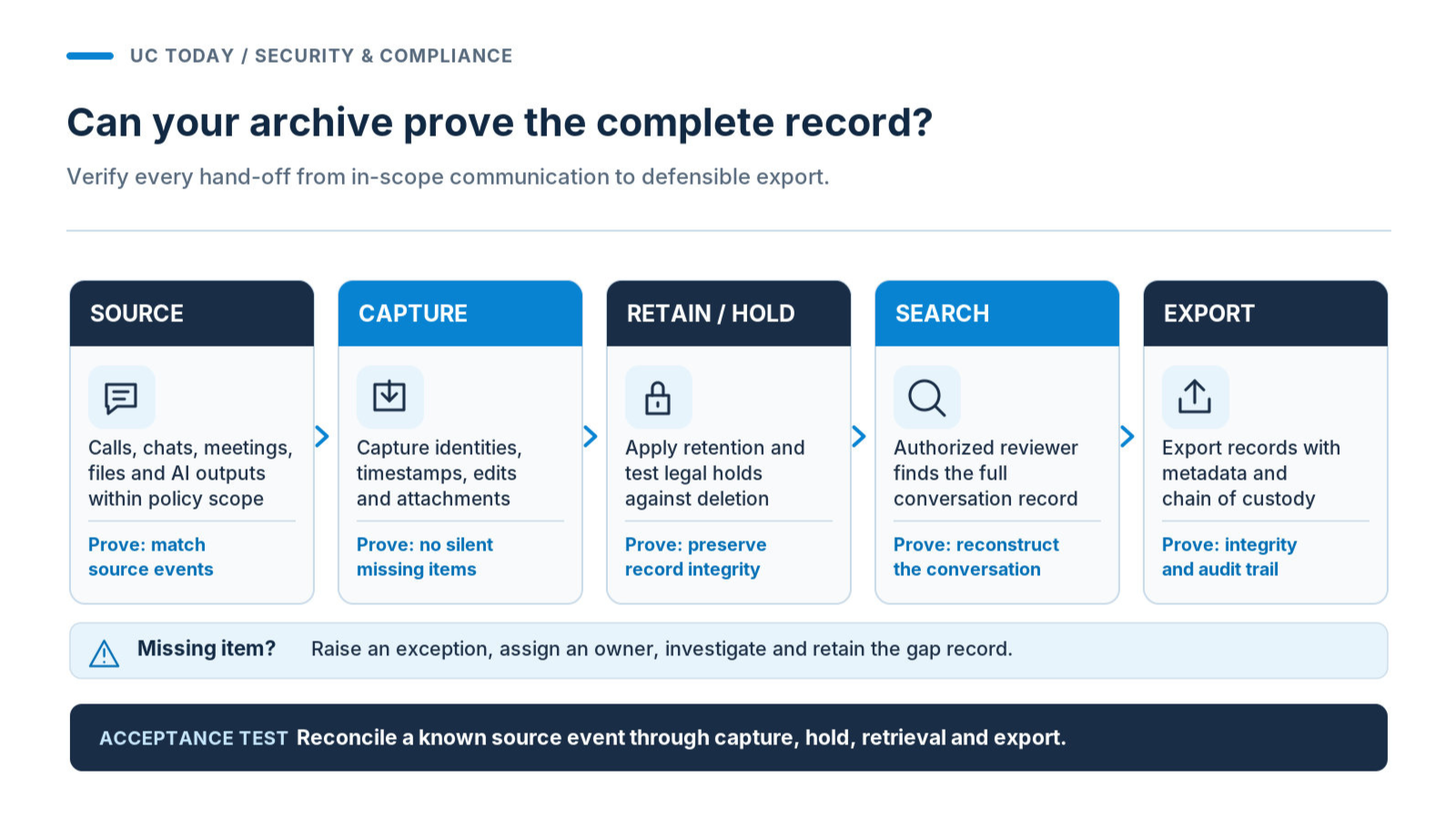
If you’re looking at automated archiving and recording, ask a vendor to demonstrate what happens when an employee joins an external meeting, exchanges chat messages, shares a contract, edits a message, then generates an AI summary.
Is every step properly recorded, with participant identities, timestamps, attachments, and relevant edits? Where does that record go?
|
Checkpoint
|
What to check
|
|
Capture
|
Ensure that you can record chats, files, people, and times.
|
|
Retention/hold
|
Make sure that you can see the appropriate policy in place. Place a legal hold to ensure nothing gets deleted.
|
|
Search/export
|
Check that an authorized reviewer can search through and find the full record. They should be able to export an audit trail.
|
|
Gap detection
|
If there's a gap, an exception will be raised with the owner and actions taken.
|
Could You Produce Defensible Evidence During an Investigation?
The real test of UC retention and eDiscovery comes when someone needs a complete record from six months ago. As Chris Reed, the head of product and technology at Wordwatch, told us:
“It’s not the compliance team who retrieve the data.”
That can be a bit of a problem if your technical teams don’t know the full context of an investigation, so make sure you put everything to the test.
Ensure that an authorized reviewer can rebuild the conversation, place a legal hold, access historical records, and export them, including an audit trail to show that nothing’s been tampered with. Check whether the process survives employee departures and archive migrations, and make sure you build an incident response playbook in advance.
Examine Residency and AI Data Handling
Everything you do to achieve secure and compliant communications today has to consider where the information you’re collecting is actually going, and it’s not always where you think.
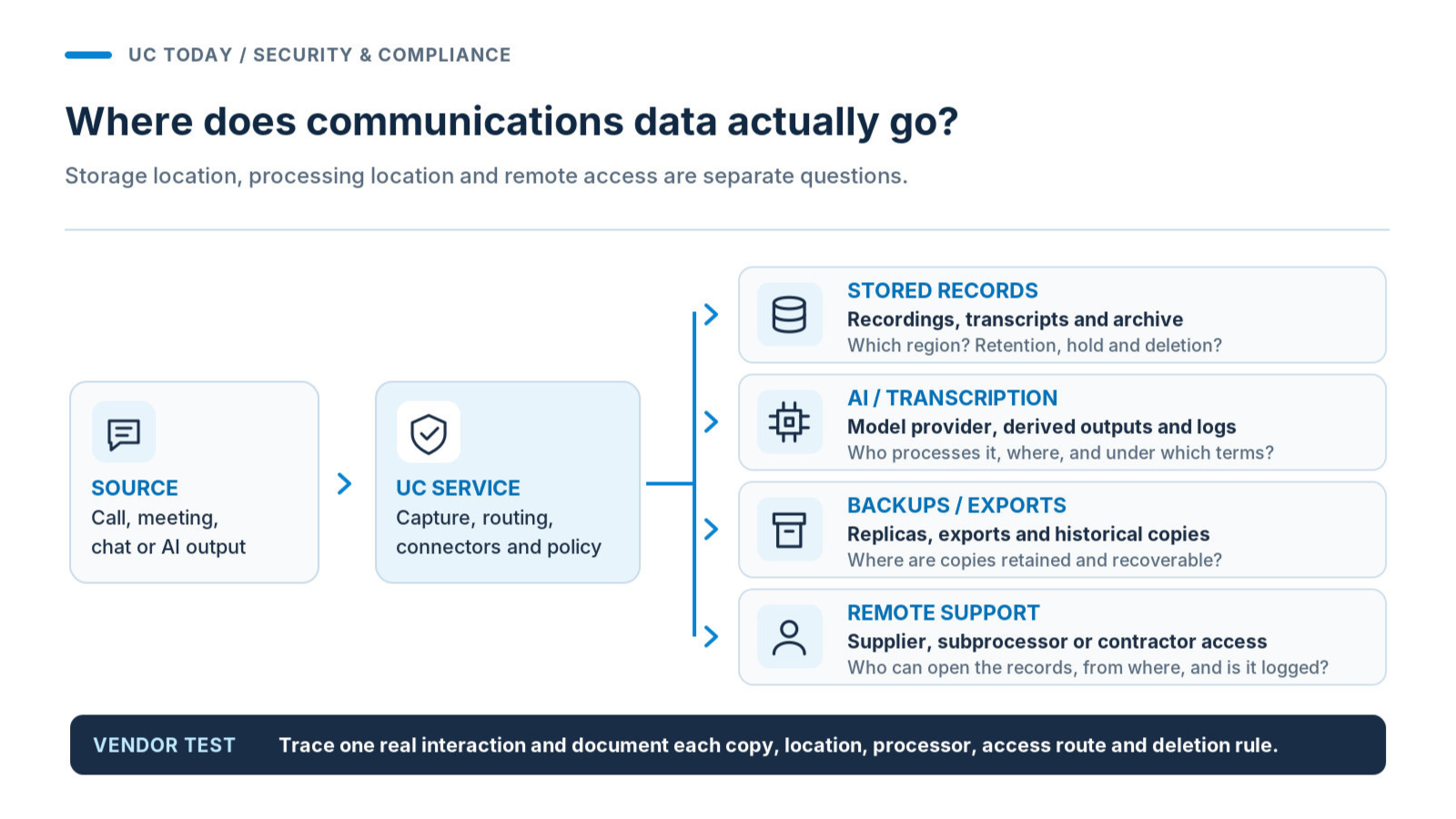
Even if you have a local data center that apparently stores everything for you, digging a little deeper could reveal that your meeting records are sitting somewhere in London while transcripts are actually processed elsewhere. Backups could move between regions depending on storage availability, or overseas contractors could get access to sensitive information.
If you’re not certain where your data actually is, you need to find out. Get written answers from your vendor about where each data type is stored and processed, which subprocessors might handle it, who can access it remotely, and what happens to exported records.
Make sure you’re asking about how that stored data might be used by the vendor, too. You don’t want to find out too late that your UC platform provider is actually using your meeting notes and AI summaries to train future AI models.
How Should AI-Generated Communications Be Governed?
Speaking of AI, there’s more to think about than just the risk that someone’s using your information for training. One thing to keep in mind is that the things an AI tool can do on your platform can change suddenly, and that has an impact on security and compliance.
For instance, Zoom introduced some pretty impressive new AI capabilities in October 2026, but it also noted that Compliance Manager support for new features in things like My Notes and Canvas wasn’t expected until January 2027.
You also need to think about the rules you’re putting in place for AI agent records. Surveillance tools can sometimes help you out with tracking, but you still need to decide:
-
Which prompts and outputs need to be retained and for how long
-
If edited summaries and content remain linked to original sources
-
Who can approve, correct, share, or remove generated material
-
Whether AI processing creates extra transfers or exposure risks
Don’t just assume AI agents automatically follow the same rules as your team, just because they’re using the same communication tools.
Think about what happens when you turn those tools off, too. Simply removing an AI assistant from a system or deleting the license doesn’t mean all the data it generated immediately disappears.
Test Resilience and Incident Obligations
You can put together an entire suite of security and compliance tools, from regionally approved recording systems to day-to-day monitoring tools, and still stumble into issues. The big problem for most companies is that it’s not always easy to see when something does go wrong.
If Microsoft Teams suddenly goes down for the whole working day, your team will probably notice that, but if a tool fails to record something important, or an archiving connector breaks, you can remain peacefully oblivious right up until an audit.
Want to avoid that last-minute moment of panic? Try simulating a small disruption to your connector. Have an internal meeting or chat to see what happens. Is there an alert raised? Can the supplier match the activity from the source, recover any items in queue, and identify anything that really can’t be recovered?
Then, decide when work needs to be moved to an approved channel and who owns that call. Sometimes systems can stay “technically active” and prevent an automatic failover.
Ensure that integrations behave appropriately when there's an expired access token or API limit. There should be fallbacks ensuring that staff can still access tools for coordination when they need it most (even if you need to move to another platform).
Who Is Responsible for Incident Response?
We’ve talked at length before about how important risk ownership and accountability are for security and compliance. We’ve also shared some useful advice from Principal at PwC, Morgan Adamskil, who suggests:
“Building really strong playbooks, understanding what’s going to happen if you have a breach.”
What you need is a plan for incident containment, rather than just detection. Your response plan needs to identify who can suspend affected workflows, authorize fallback channels, preserve evidence, and even reach out to suppliers.
You’ll also need to analyze your contracts for clear notification and recovery responsibilities, particularly if you’re following specific regulations. With DORA, for instance, there are specific requirements around how ICT incidents are managed and reported for financial entities.
Make sure you have a backup strategy in place too; that might mean having an independently accessible emergency communications channel set up, or a copy of historical records when you’re migrating from one archive to another.
Run the Vendor Review and Operating Cadence
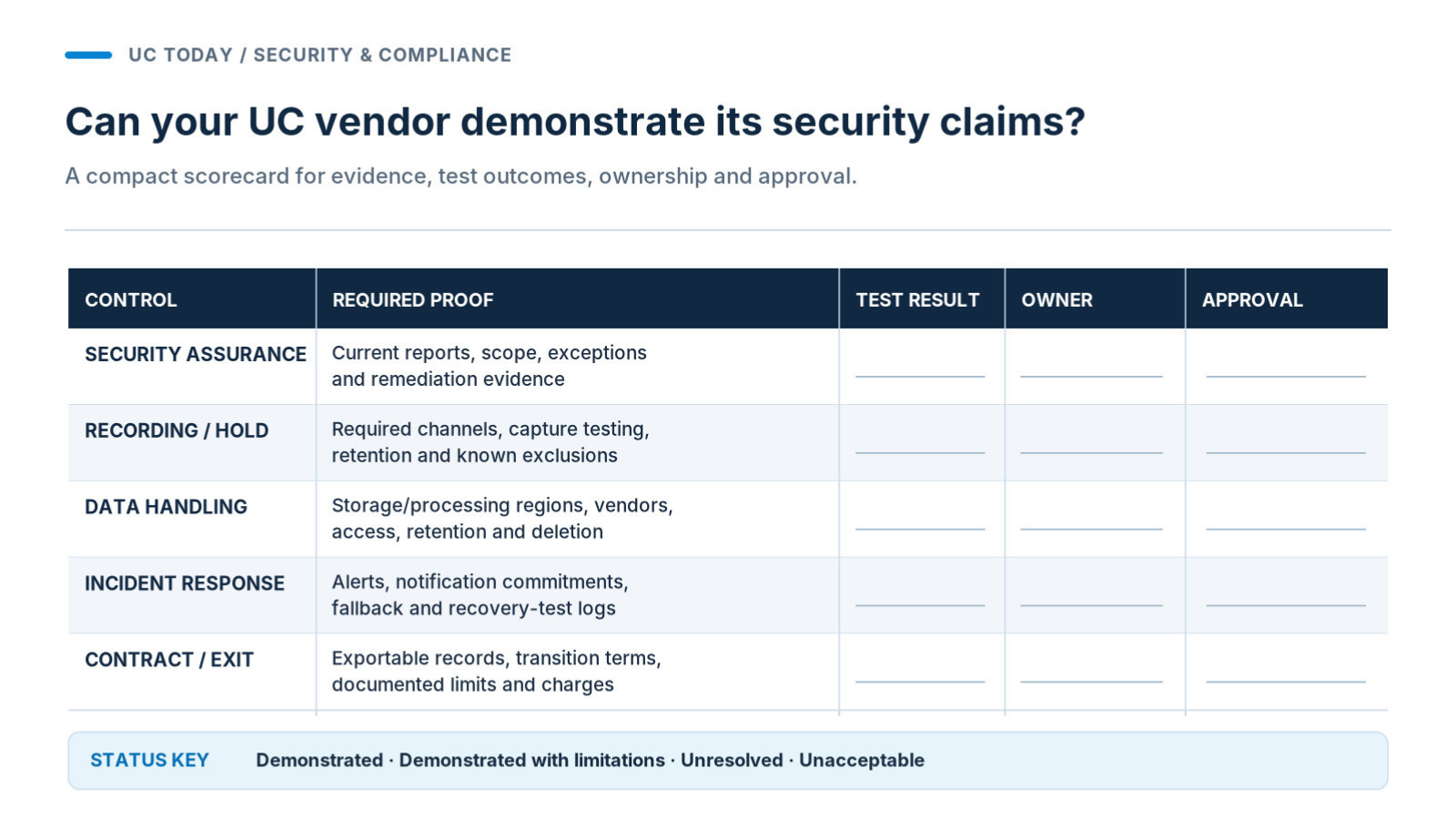
As we said before, if you’re judging vendors based on risk, don’t just check for certification badges; request detailed reports, scope information, and insights into potential exceptions.
When talking about his cybersecurity approach, Nyere Hollingsworth, the Managing Director of Endpoints and Workplace Experience Technologies at Winston Taylor, told us that
“It has to be intentional.”
If a manufacturer can’t directly prove that they satisfy his organization’s security requirements, then he won’t buy their equipment.
If you’re building your own checklist, make sure it covers:
|
Vendor evidence
|
What to insist on
|
|
Security assurance
|
Current reports, what was included, exceptions, and remediation.
|
|
Recording and retention
|
What channels are supported, tests to show capture, and what isn't captured.
|
|
Data handling
|
Where data is processed, sub-processors, access, and deletion terms.
|
|
Incident management
|
Commitment to notify, escalation contacts, and evidence of recovery testing.
|
|
Contract and exit
|
Evidence to support audits, data can be exported, and what the limitations are.
|
Ensure that you double-check that features are actually available to you now, too, not just planned on the roadmap. Also, ask about ingestion charges, storage growth, and investigation-related retrieval fees, so you’re not caught out by the bill later.
Who Owns the Controls After Deployment?
Once you’ve deployed a platform, the responsibility for making sure everything stays secure really comes down to you (unfortunately), which means you need to figure out who’s going to be in charge of what.
A compliance alert isn’t going to do you much good if every department and team member assumes someone else will do something about it. So consciously choose one named policy and evidence owner, and get your UC operations team to manage platform and connector controls.
Usually, records teams should deal with capture and retrieval, while HR and legal/privacy teams manage employee information obligations.
Categorize all mandatory requirements into Demonstrated, Demonstrated with Limitations, Not Resolved, and Unacceptable. Always ensure you know who approved and when exceptions will expire. Ensure everything is tested and tested again whenever new AI features, external collaboration tools, regional teams, or suppliers are added.
Achieve Truly Secure and Compliant Communications
In an ideal world, you could pick a secure communications platform, install a few monitoring and archiving tools, and assume you’re fully covered. If only it were that simple.
The trouble is, even the most trustworthy UC platforms can’t control every decision your employees make, every AI feature a new vendor introduces, or every gap that might end up opening between your connected systems. Looking for a platform and toolkit that offers plenty of great features is helpful, but you still need to get evidence that those features work in your environment, with your teams.
Start with your biggest risks, check who can access sensitive information, which communications you need to retain, and whether you can really prepare for an audit. Get vendors to demonstrate their claims for where they can help you, too.
Most importantly, keep checking up on your strategies. UC security and compliance isn’t really something you can figure out once and then forget. As your workplace changes, your controls need to keep up.
FAQs
What’s the Difference Between UC Security and Compliance?
Security is about protecting conversations, accounts, and sensitive information. Compliance is more focused on recording, privacy, and recordkeeping obligations. You need to account for both when you’re building a trustworthy UC system.
Are Microsoft Teams, Zoom, and Webex Compliant Out of the Box?
That depends on the type of compliance you’re asking about. All three options offer compliance and security features, but what’s actually available depends on a lot of different things, including your licenses, configuration, region, and any connected services.
What Security Evidence Should a UC Vendor Provide?
Having current SOC 2 reports and ISO Certifications, documented exceptions and incident management commitments is a good start. A proper UC vendor risk assessment should also include practical testing. Be wary of vendors who aren't willing to talk about previous audit findings.
How Do You Prove Call Recording and Archive Completeness?
Test using real processes across all required channels. Ensure that what you expect to communicate matches what has been captured including attachments and amendments. Ensure that alerts are raised if calls aren't recorded and that investigators can retrieve the original evidence.
How Often Should Organizations Review Communications Security and Compliance?
More than you'd probably like! At least every quarter review high risk exceptions. Full reviews should be carried out annually. Any new AI features, platforms, integrations or new suppliers should be reviewed. If there's any change to a regulation or law.