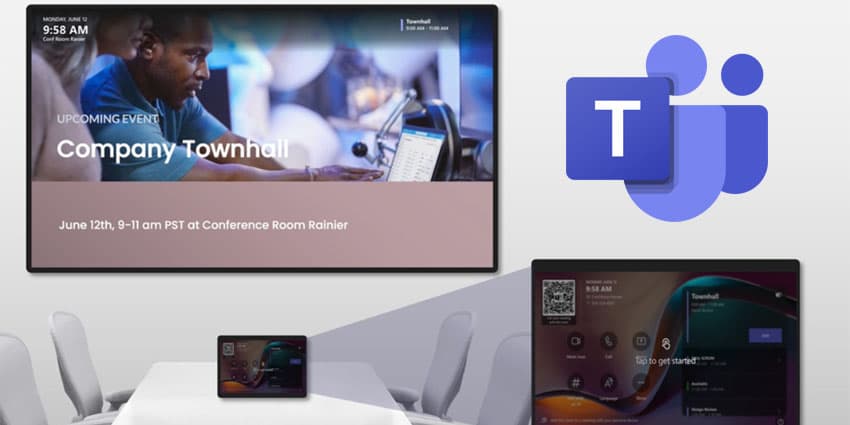
Microsoft is making moves in the digital signage space by introducing digital signage functionality for Teams Rooms on Windows.
Microsoft is creating opportunities for organisations to use their Teams Rooms hardware for signage, in addition to meetings and presentations, enabling them to communicate to teams, showcase company news upcoming events, and reinforce brand messaging.
Henrika Lim, Product Manager at Microsoft, wrote in an announcement blog:
Digital signage in Microsoft Teams Rooms expands communications into your meeting spaces, enhancing employee engagement and connection. When your Teams Rooms devices are not used for meetings nor presentations, you can set them up to run in signage mode, where the front-of-room displays show dynamic content and relevant information in rotation."
Microsoft outlines that, in Signage mode, the front-of-room display showcases content. At the same time, the Teams Rooms banner keeps room information and calendar previews visible, ensuring users remain aware of the room context.
If a user or admin prefers the signage content to occupy the entire display without any overlays, they can hide the Teams Rooms banner. A simple tap on the touch console in signage mode will return the device to the Teams Rooms home screen.
Microsoft suggests signage mode offers complete control and flexibility. It activates and deactivates based on timers the user or admin sets. They can determine how long the device must be idle before it activates and how soon before a meeting it deactivates. For early arrivals or those lingering after meetings, the timers can be set to the lowest values to ensure visibility of signage content.
Users and admins can also decide if signage mode follows the operating system’s screen timeout settings. To prevent screen burn and meet sustainability mandates, keep the default behaviour of adhering to screen timeout settings. However, devices in rooms with glass walls or high-traffic areas can opt to ignore screen timeout settings to maximise signage visibility.
Digital signage is currently available for Teams Rooms on Windows, Teams Rooms Pro license, and commercial cloud customers.
Microsoft's Digital Signage For Teams Rooms Appspace And XOGO Integrations
Microsoft has partnered with Appspace and XOGO to integrate their digital signage solutions into Teams Rooms, making it easier for organisations to create, deploy, and manage digital signage content. These trusted third-party options are available in the Teams Rooms Pro Management portal.