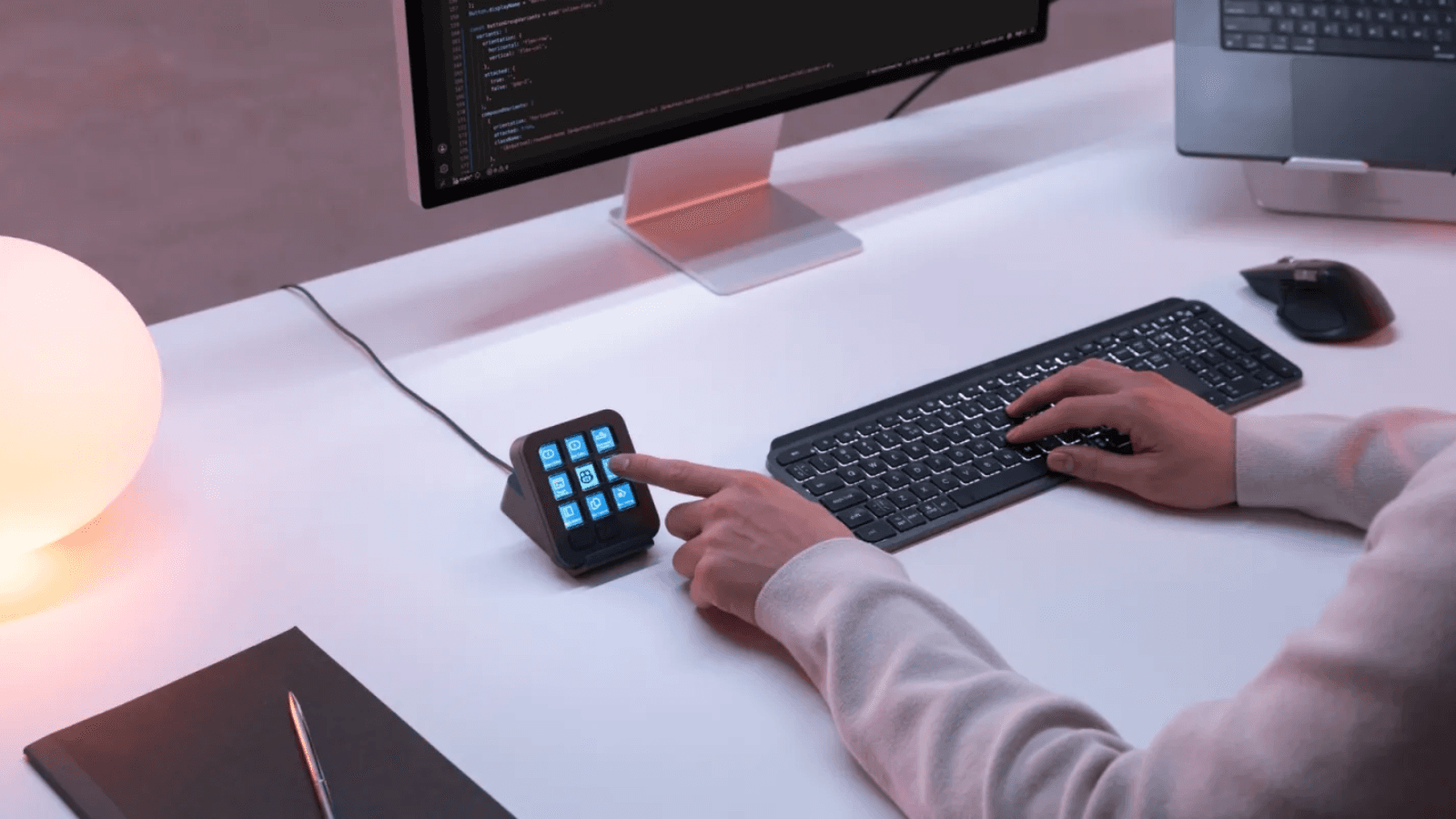
Logitech MX Keypad is Logitech’s answer to that fragmentation. Announced on September 8, the $99.99 programmable keypad gives developers physical shortcuts for AI tools, coding commands, and repeatable prompt workflows.
Rather than make developers adapt to another software dashboard, Logitech wants them to configure a small hardware control surface around the way they already work. The product launches with GitHub, VS Code, and GitHub Copilot integrations, while community plugins extend support to Claude Code and OpenAI Codex.
Logitech has already applied a similar friction-reduction approach to hybrid meeting rooms. Its Rally room systems combine hardware, AI features, and management tools to make rooms easier to operate. MX Keypad brings that same focus on smoother workflows to the developer desk.
TL;DR
-
Logitech MX Keypad is a nine-key programmable control device for multi-app and multi-agent coding workflows.
-
Its early value depends on whether developers can turn repetitive actions into reliable, context-aware shortcuts.
-
Native GitHub, VS Code, and Copilot support gives the device a credible starting point, but the ecosystem remains the larger test.
-
At $99.99, it sits below the cost and complexity of broader control-console products, but it must prove it saves more time than keyboard shortcuts already do.
Why are AI coding workflows becoming harder to manage?
AI coding workflows are becoming harder to manage because developers now coordinate several specialized tools during a single task. A developer may use an IDE to write code, an agent to plan or generate changes, a terminal to run tests, and a separate interface to review prompts or monitor progress.
This is not simply a question of using more software. It changes the nature of the job. Developers increasingly direct, check, and refine AI systems alongside their own coding work. Each context switch can interrupt concentration, particularly when a task requires repeated commands or a reliable sequence of prompts.
Logitech positions MX Keypad as a physical layer for that work. The device allows users to assign actions to individual LCD keys through Logi Options+. Those actions can include shortcuts, scripts, macros, prompts, and commands across supported applications.
What does Logitech MX Keypad actually do for developers?
Logitech MX Keypad lets developers map recurring actions to programmable physical keys, including prompts, code refactoring commands, scripts, and agent controls. The device can support one or multiple apps and agents from each configured key, according to Logitech.
The hardware includes nine customizable full-color LCD keys. Page controls can expand the number of available layouts, while app-aware profiles can switch key assignments when users move between applications. That design could make the same keypad serve different functions in VS Code, a terminal, a browser, or a collaboration tool.
-
Prompt macros can place repeatable instructions within immediate reach, which may help teams standardize common tasks such as generating tests, explaining a code block, or drafting documentation.
-
Command launching can reduce the friction of starting recurring local scripts, builds, reviews, or terminal actions.
-
Agent controls can offer direct access to supported AI agents and, through available community plugins, surface controls such as agent status tracking.
-
Application-specific profiles can change a key’s role based on the active application, avoiding a fixed one-size-fits-all layout.
These capabilities will sound familiar to users of macro pads and creative control surfaces. Logitech’s distinction is its developer focus and its attempt to connect hardware controls to a fast-moving AI coding ecosystem.
How deep is Logitech’s GitHub and Copilot integration?
Logitech says it developed MX Keypad in close collaboration with GitHub and will launch with native GitHub integration, including VS Code and the GitHub Copilot app. That relationship gives the product an important early advantage because GitHub Copilot already sits inside many developers’ existing workflows.
Anatoliy Polyanker, VP and GM at Logitech, said:
“Today, coding mastery depends on how easily developers can juggle between an ever-increasing range of AI tools. MX Keypad puts a physical control center at your fingertips, allowing you to orchestrate your AI workflows faster and more intuitively.”
GitHub’s involvement gives Logitech a clearer story than a generic programmable keypad. The device is not just designed to trigger standard keyboard shortcuts. Logitech can build and distribute purpose-built actions for a major coding platform and its AI assistant.
Martin Woodward, VP of Developer Relations at GitHub, said:
“Great developer tools get out of your way. MX Keypad makes working with GitHub Copilot feel like a natural part of the workflow, so developers can spend less time navigating tools and more time building.”
Every MX Keypad also includes three months of GitHub Copilot Pro+, redeemable through Logi Options+ for new and existing users. That offer may help lower the barrier for developers who want to test a hardware-and-AI workflow together.
What should buyers look for?
-
Native actions: Ask which GitHub, VS Code, and Copilot actions work at launch, rather than assuming every interface feature has a mapped control.
-
Profile behavior: Check whether layouts switch reliably between the applications developers use most.
-
Team governance: Determine whether prompt macros and scripts can be shared, reviewed, and maintained safely across a development team.
Can a physical AI control center improve developer productivity?
A physical AI control center can improve productivity when it removes repeated navigation from high-frequency tasks. It will not help every developer equally. Its value will depend on whether users have stable, repeatable actions that benefit from dedicated controls.
For example, a developer might assign one key to open a code-review prompt, another to start a local test suite, and a third to run a carefully defined refactoring task. The advantage is not that these actions become possible. Most already are. The advantage is that they become visible, immediate, and potentially easier to repeat consistently.
That is also where the product faces its hardest comparison. Experienced developers already use keyboard shortcuts, command palettes, shell aliases, IDE extensions, and automation tools. MX Keypad must save enough time, or reduce enough mental overhead, to justify another device on the desk.
The device may appeal most to developers who regularly work across several AI coding interfaces, or to engineering leaders who want a more approachable way to standardize approved prompt flows and common developer actions. It may offer less value to developers whose work happens mainly in one IDE with a highly optimized keyboard setup.
How does the Logi Actions SDK affect the MX Keypad ecosystem?
The Logi Actions SDK could determine whether MX Keypad becomes a useful specialist device or a broader developer platform. Logitech says the SDK lets software engineers build custom tools and integrations, while its documentation supports AI-assisted development of those integrations.
Logitech also says community-built plugins for Claude Code and OpenAI Codex are already available through Logi Marketplace. Those plugins reportedly offer real-time agent status tracking and command-line interface control through the physical keys.
A hardware device cannot remain useful by supporting only a small, fixed list of integrations. Logitech needs developers and partners to connect emerging tools, update workflows, and share profiles faster than a traditional peripheral release cycle allows.
There is a practical caveat. Community plugins can expand choice, but they also create questions around support, security, and maintenance. Enterprise buyers should establish who owns a plugin, what permissions it requires, how it handles developer data, and whether it remains maintained as the underlying AI tool evolves.
What should enterprise developers consider before adopting MX Keypad?
Enterprise developers should treat MX Keypad as a workflow experiment first, then measure whether it reduces task time, context switching, or errors in repeatable processes. The product is available in select markets in Graphite and Pale Gray for $99.99 USD or €99.99.
-
Start with repeatable work: Identify tasks that occur several times per day, such as test commands, code-review preparation, environment switching, or approved prompt templates.
-
Test integration depth: Validate the supported actions for GitHub Copilot, VS Code, IntelliJ IDEA, Claude Code, and any other required tools before deployment.
-
Review security controls: Ensure scripts, prompts, tokens, and third-party plugins meet internal development and security policies.
-
Measure adoption: Compare task completion time and user satisfaction with existing shortcut, command palette, and terminal workflows.
-
Plan for change: AI coding tools evolve rapidly, so assess Logitech’s SDK and marketplace support as carefully as the hardware itself.
Final Takeaway: Logitech is betting that AI development needs a physical control layer
Logitech MX Keypad arrives as developers face a real workflow problem. More AI agents and coding tools can accelerate work, but each additional interface can also add friction. Logitech’s device tries to make that growing toolset easier to direct through programmable, application-aware physical controls.
Its early GitHub, VS Code, and Copilot integration provides a credible foundation. The larger opportunity rests on the Logi Actions SDK and community ecosystem. If developers can build reliable integrations for the tools they actually use, MX Keypad could become more than a convenient macro pad. It could become a compact control layer for AI-assisted development.
For now, buyers should judge it on the practical basics: how many recurring actions it removes, how well its integrations work, and whether it earns a permanent place alongside an already crowded developer tool stack.
Frequently Asked Questions
What is Logitech MX Keypad?
Logitech MX Keypad is a programmable physical keypad designed for developers working across AI agents, coding tools, and IDEs. Users can assign prompts, shortcuts, scripts, commands, and supported agent controls to its LCD keys through Logi Options+.
Which coding tools work with Logitech MX Keypad?
Logitech says MX Keypad supports workflows across GitHub Copilot, Claude Code, VS Code, and IntelliJ IDEA. It launches with native GitHub, VS Code, and GitHub Copilot integration, while community plugins for Claude Code and OpenAI Codex are available through Logi Marketplace.
Does Logitech MX Keypad include GitHub Copilot?
MX Keypad includes three free months of GitHub Copilot Pro+ for new and existing users. Users can redeem the offer through Logi Options+, according to Logitech.
Can developers create their own MX Keypad integrations?
Yes. Logitech says developers can use the Logi Actions SDK to build custom tools and integrations for MX Keypad. This capability could help teams connect internal workflows or tools that are not covered by the launch integrations.
How much does Logitech MX Keypad cost?
Logitech MX Keypad launched in select markets on September 8, 2026, in Graphite and Pale Gray. Logitech lists the price at $99.99 USD or €99.99.