Hybrid work has forced enterprises to rethink the way they run meetings. For IT leaders and facilities teams, the challenge isn’t just about adding more video screens - it’s about making sure every room works as predictably as the laptops on people’s desks. That’s why certified Microsoft Teams Rooms vendors have become such a critical part of the conversation.
These are the companies designing and delivering the hardware and software that bring Microsoft Teams to life in physical spaces. From touch panels and cameras to complete room kits, their solutions are tested by Microsoft to guarantee consistency, security, and ease of use.
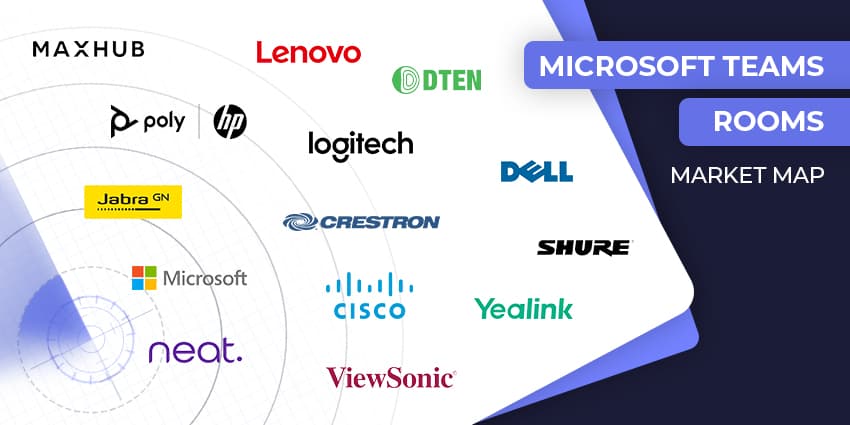
In this guide, we’ve rounded up the leading Microsoft Teams Rooms vendors, taken from our Teams Rooms marketplace. Each has a slightly different approach, but all are focused on solving the same problem: how to connect people seamlessly, whether they’re across the table or halfway across the world.
VISIT THE TEAMS ROOMS MARKETPLACE
Top Microsoft Teams Rooms Vendors
The Microsoft Teams Room Vendors Maximizing Meetings
Every vendor on this list has already been through Microsoft’s approval process. That means the cameras, mics, and room systems you’re looking at aren’t just built to run Teams - they’ve been tested to prove they can do it reliably.
Microsoft checks the basics, like video and sound, but also the less visible pieces: security standards, how devices can be managed at scale, and whether they’ll hold up in day-to-day use. This guide will give you a clear sense of the landscape: who’s strong on all-in-one systems, who’s better suited for larger deployments, and where you might want to focus as you narrow down your shortlist.
Crestron
Crestron has long been a go-to in corporate AV, and their Flex line is one of the most trusted among solutions offered by Microsoft Teams Rooms vendors. These aren’t just boxes that happen to work with Teams; they’re built in collaboration with Microsoft, tested for everything from audio/video quality to security and usability.
You’ll find options that scale neatly, whether it’s a UC-MMX30 tabletop unit for small huddle spaces or larger NUC-based systems for boardrooms. Plus, Crestron’s Automate VX system has earned certification too - this means you can get hands-free camera tracking with optical zoom and multi-camera setups, tuned to Microsoft Teams.
There’s a real enterprise focus here: everything can be managed through XiO Cloud, updates handled centrally, and there’s support available - even extended warranties, so IT teams get real peace of mind.
Dell
Dell is growing fast in the Teams Rooms space by pushing end-to-end simplicity. Their packaged room solutions combine the OptiPlex 7000 XE Micro (a solid Intel Core i7, 16 GB RAM, room-friendly IO), large-format touch displays, and Logitech conferencing peripherals - all pre-certified for Teams Rooms.
Companies can simply select a room size and get a predictable, supported setup that deploys quickly. Plus, Dell doesn’t leave complexity to you. They offer Platform Readiness and full Implementation Services, so you’re not just buying hardware, you’re getting experts to verify that everything works across your tenant, with security and lifecycle needs addressed up front
The company also offers ProSupport for Video Conferencing, which gives you 24/7 monitoring, diagnostics, and proactive issue resolution, not just a phone number to call when things break
HP/Poly
HP and Poly have combined engineering smarts with collaboration experience and rolled it into Teams Rooms kits that teams can rely on. The Poly Studio Room kits, when paired with HP’s mini conferencing PC (now with 13th‑Gen Core i7), give you polished video and audio, a responsive touch controller, and punchy Intel‑powered performance, all certified for Teams Rooms.
Like many Microsoft Teams Rooms vendors, HP and Poly keep things flexible. You can kit out small areas with one bar and controller, or scale up to larger spaces with dual cameras or advanced audio setups. Plus, with Poly Lens support on Teams Rooms for Windows, IT can manage rooms remotely, troubleshoot, and pull usage data, all from a central dashboard.
So if your priority is flexible, modular hardware that handles both the tech and the management angle, HP/Poly land in a solid spot.
Lenovo
Lenovo’s ThinkSmart gear has come a long way over the years. The ThinkSmart Core Full Room Kit comes with compute, a touchscreen controller, audio bar, camera, and even satellite mics if needed, all certified for Teams Rooms. It’s built on Intel Core vPro, runs Windows 11 IoT, and does exactly what you expect in terms of connectivity and manageability.
Today, companies can also access ThinkSmart Core Gen 2, which adds AI smarts to the mix. You get enhanced camera framing, auto-generated meeting recaps, follow-up action suggestions, and even Copilot integration. Lenovo’s also pushing a new all-in-one wall-mounted option called the ThinkSmart One Pro, ideal for neat, compact installs.
Plus, companies can leverage the ThinkSmart Hub, for one-touch meeting join, and industry-leading audio. Lenovo also offers managed services, support, and technical guidance to business leaders.
Logitech
One of the top Microsoft Teams Rooms vendors with a long-standing relationship with Microsoft, Logitech offers solutions ranging from Brio meeting cameras, to Logitech Dock technologies, and Logitech Sight huddle room cameras. There are even screens, tablets, and displays available for meeting room management via Logitech Sync.
Logitech has always struck the balance between simple deployment and reliable gear, and that’s no different with their Teams Rooms push. Their entry-level system for small spaces is gaining buzz, especially now that Teams on Android is shifting over to using the AOSP management model in the backend.
Another plus: Logitech USB peripherals tied to Teams Rooms on Windows now get certified updates via Windows Update. That means patched plug‑and‑play gear, with little admin overhead.
MAXHUB
MAXHUB is a relatively fresh face in the Teams Rooms space, but they launched strong with the XT Series and XCore Kit. The XT Series positions itself as a cost‑balanced way to move BYOD rooms into smart meeting spaces, combining audio, video, and display into tidy packages that Microsoft has certified. It’s a solid move for organizations wanting standardization without overkill in budget.
Then there’s the XCore Kit, which is even more stripped‑down, and smart. It’s a Windows-based compute plus console, linked via a single USB‑C cable. Clean, simple, and easy to retrofit into existing rooms.
Companies can also take advantage of the XT10-VB kit with an included video soundbar, featuring 4K camera resolution and a six-way microphone array. MAXHUB’s Microsoft Teams Rooms equipment can also be expanded with a series of displays and complementary audio products.
Microsoft
Alongside partnering with countless AV and technology companies, Microsoft also creates its own hardware solutions for Microsoft Teams Rooms. With Surface Hub 3, Microsoft brings an all-in-one touchscreen whiteboard turned premium meeting board into the mix, one that runs Teams Rooms on Windows, not just Teams.
You get this massive, anti‑glare 4K screen that supports active inking, portrait mode, Miracast casting, and one-touch join. What makes it stand up is the AI layer. The Smart Camera gives you IntelliFrame tracking, and now Surface Hub 3 is rolling out speaker recognition with the Facilitator feature (it can take notes, summarize, even assign follow-ups), all while respecting privacy and encryption.
Managing it is also straightforward, with Windows Autopilot, Intune, Teams Admin Center - the whole Microsoft modern deployment stack. It’s built for IT that wants control with minimal friction.
Shure
Shure’s IntelliMix Room Kits are clearly aimed at one thing: making audio sound edge-to-edge excellent, first in the room, then to Teams. These kits come bundled with a Windows Teams Rooms compute, the IntelliMix DSP, a touch panel, ceiling-array mic/speaker combo, and a Huddly camera. Install, power on, and go.