Kandao Meeting S just got a major upgrade! The screen-mirroring function has been added, making it the most powerful communications and collaboration tool on the market.
With this new feature, users can share their screens with others in real time, making it easy to collaborate on projects or presentations. This upgrade makes Kandao Meeting S an essential tool for businesses and individuals who need to stay connected and productive.
The screen-mirroring function is beneficial because it enables users to share their screen with others in real time, makes collaboration easy, and is essential for businesses and individuals who need to stay connected and productive.
One-Step Screen Share from Multi-Type Devices
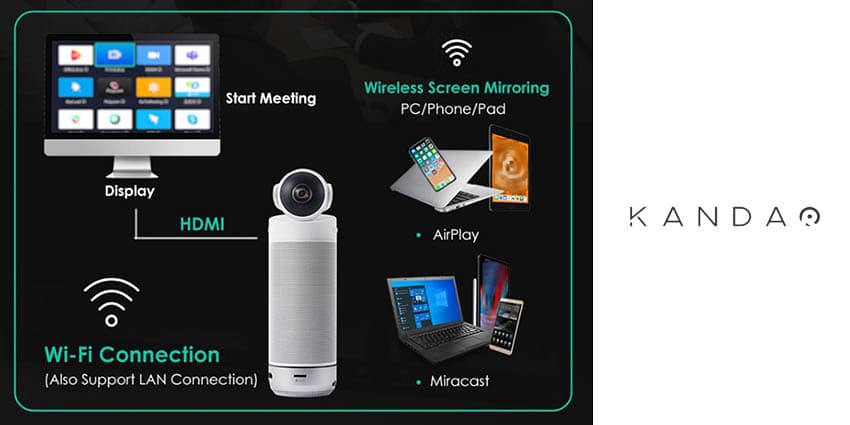
Pressing the “Winkey” and “K” buttons on your keyboard is the only step to achieving screen sharing on computers with a Windows system.
Until today, participants needed to purchase a wireless screen-mirroring device which base unit and dongle are necessary for sharing your screen, but you can now wave goodbye to all the complicated and time-consuming preparation you did for screen sharing without forcing you to connect your computer to the same network as the one that conferencing camera is using.
Besides Miracast, Airplay is also integrated, which means Meeting S can not only support share screen from a Windows-system PC, but also a Mac, an Android phone, iPhone, and even an iPad, which makes it path-breaking.
The Most Money-Saved and Space-Saved Immersive Meeting Room Solution
Kandao Meeting S is equipped with a 195-degree lens to achieve an all-attendee-covered 180-degree image without distortion. This allows every attendee to join the conversation in real-time with its full-duplex audio system which consists of eight pro-grade microphones and an array of Hi-Fi speakers.
Having an Android system built-in is another feature that distinguishes Kandao from the rest of the solutions on the market. There is no need to install conferencing software over again whenever you change a computer, software can be directly installed and run on the Meeting S.
Kandao Meeting solutions also come with a cutting-edge AI recognition algorithm built-in, which allows the spokesman to be precisely real-time located, tracked, and highlighted. Now that the screen-mirroring function has been released, Kandao Meeting S conducts a perfect and immersive hybrid meeting experience for meeting attendees.